Key takeaways
- An autonomous AI voice agent takes a call through to a result, with no sign-off from your team.
- An agent can choose the right action and get the specifics wrong, so hold back its ability to alter records until the rest is proven.
- People trade turns in a few hundred milliseconds, and the phone connection has already used part of that window before software starts.
- Write the handoff rule before launch, including what the agent does when your team is offline.
- Generated callers find weak spots on your schedule, and each scenario needs several attempts before the result means anything.
A customer calls after closing, and an autonomous AI phone agent answers. Whether they hang up with what they want depends on how much that software is allowed to decide.
What an autonomous AI voice agent is
An autonomous AI voice agent answers a phone call and completes what the caller needs without a person listening in or approving each decision. Speech recognition handles what the caller says, a language model works out the response, and a text-to-speech engine speaks it back.
A caller opens by asking to cancel Thursday's appointment, then halfway through decides they want to keep the slot and move it to the following week. The agent follows the change and books the new time without asking for details the caller already gave. No call flow was written for someone who changes their mind mid-sentence.
Phonely and much of the market say voice agent, other companies say AI phone agent or voice AI, and the terms sit loosely enough that two products described in identical language can behave nothing alike once a real call comes in. Phone menus and website chatbots automate calls too, and our breakdown of IVR, IVA, and voice AI covers where each category fits.
How much autonomous AI phone agents decide on their own
Autonomy arrives in degrees. A product sold as autonomous might reason its way through a conversation and still stop before it touches your booking system:
Levels three and four are the ones worth comparing. Keeping a person in the approval path caps what a bad call can cost you, and it also caps how many calls finish without staff time. Removing that check leaves the outcome to the agent's judgment.
That judgment holds up unevenly as calls get harder. Researchers sorted 100 spoken scenarios into three tiers by how many tool calls and how much reasoning each one needed. The strongest of six systems finished 75% of the single-step scenarios. On multi-step scenarios carrying conflicting constraints, that dropped to 43%.
How to tell which level you are running
Call your own main line and ask for two things in one sentence, the way callers do when they are busy. Listen for what happens to the second request. If it disappears, the system sits in the top two rows, whatever the vendor's description says.
What autonomous means during a live call
Working out what to do and doing it are separate jobs:
- Deciding and acting without a person in the loop
Callers arrive with incomplete information. Someone calls about a delivery without an order number, or describes a fault in words that match nothing in your help pages. An agent with room to decide looks for another route, identifying the caller from the number and reading back the most recent order to confirm it.
- Calling tools and updating business systems in real time
A tool call is the agent reaching into another system mid-conversation, checking a calendar slot or writing a booking into it. Some of those actions reverse easily, and some do not.
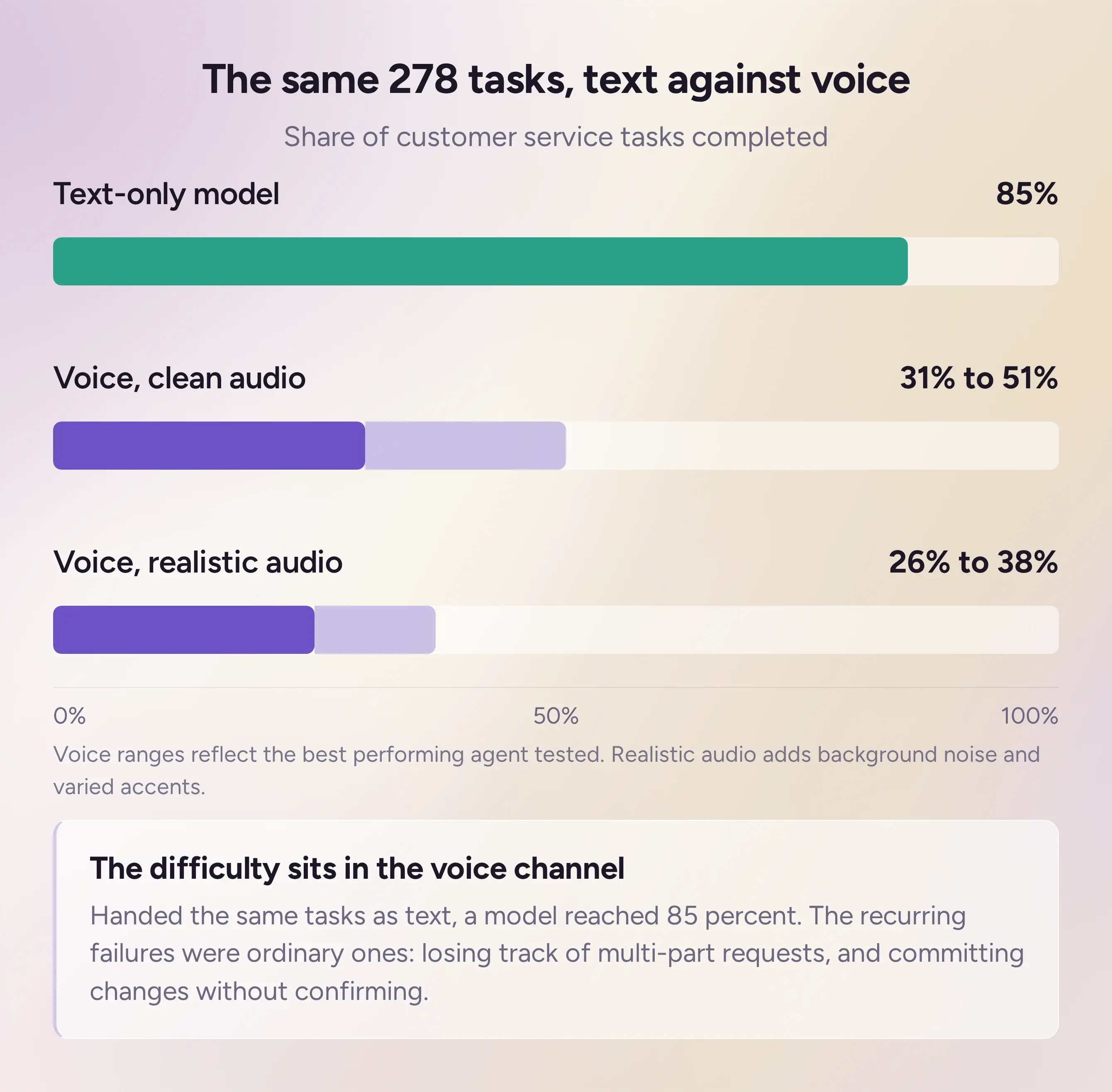
Across 278 customer service tasks run against real databases, the best voice agent managed 31% to 51% on clean audio. Under background noise and varied accents, that fell to 26% to 38%. A text-only model handed the same tasks reached 85%, which places the difficulty in the voice channel. The recurring failures were ordinary. Agents lost track of multi-part requests, and they committed irreversible changes without pausing to confirm.
Write access deserves more caution than read access, since a booking dropped into the wrong slot stays there until someone notices.
Latency and interruption handling that keep a call natural
Callers judge an agent against people, and people answer each other fast. Studies of recorded conversation report median gaps between speakers under 300 milliseconds.
A phone call has little delay to spare before the agent joins it. ITU-T states that most applications hold essentially transparent interactivity when mouth-to-ear delay stays under 150 milliseconds, and it notes that highly interactive tasks can be affected below 100 milliseconds. An agent adds speech recognition and speech generation to what the call already spends, along with the time it takes to decide what to say.
Interruption handling turns on one judgment the agent repeats through the call. Has the caller stopped talking, or paused mid-thought? The agent either leaves silence where a person would have replied, or starts speaking while the caller is still going.
Ask for a demo call, pause mid-sentence as if you are reading a number off a screen, and listen for what happens next.
When the agent should escalate to a person
Most lines keep a route to a person. Which calls take it, and who sets that rule, are separate decisions:
- Setting the rules for when a human takes over
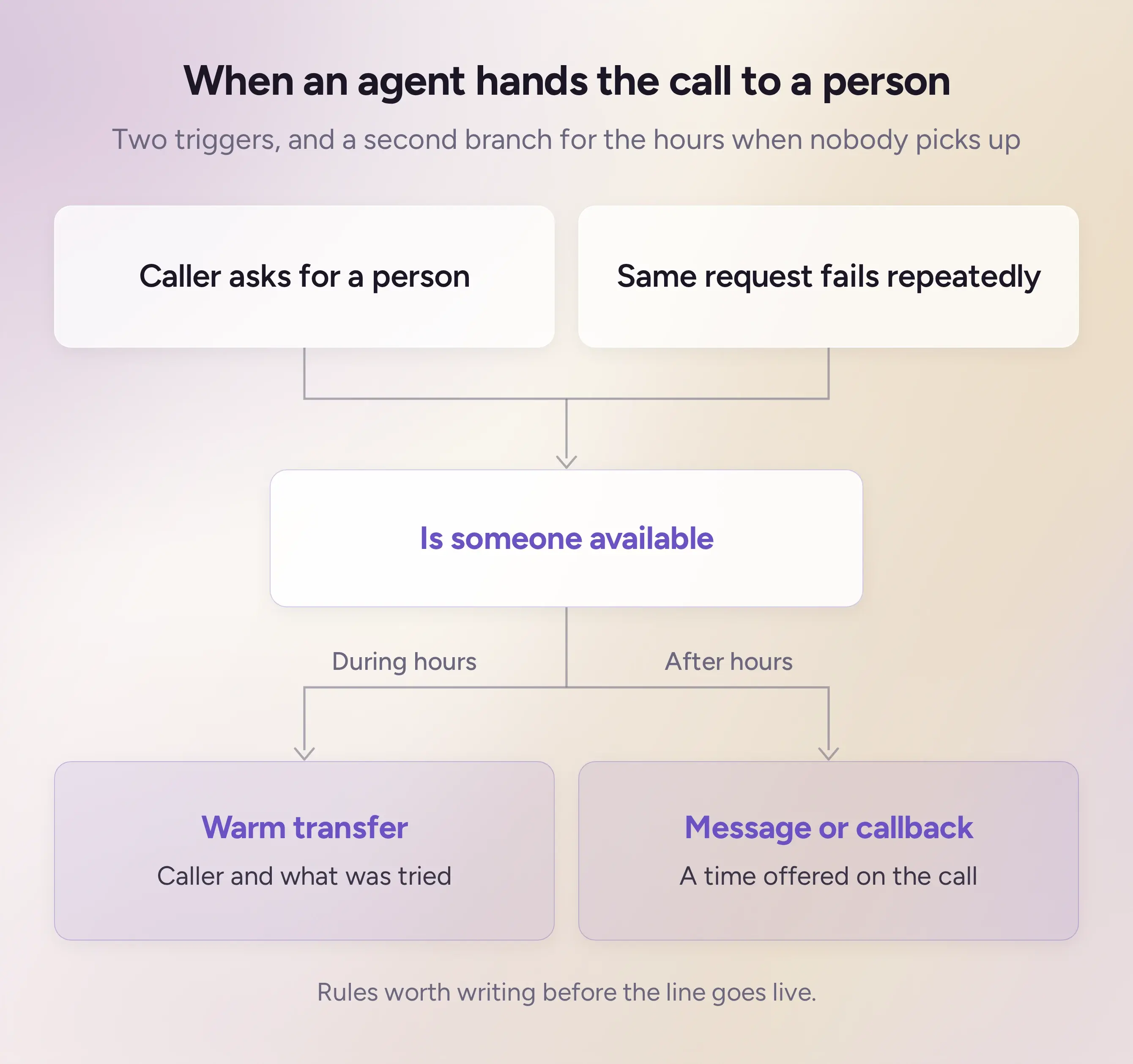
One trigger needs no detection at all. Someone asks to speak to a person, sometimes before the agent has finished its first sentence. Handing over on the first try gives up calls the agent could have closed, and refusing carries its own cost on the calls that do get finished.
Repeated failure on one request is the other trigger worth setting, since an agent looping on the same answer will not resolve the call on its own. Who controls that trigger varies, with some platforms letting you write the condition and others deciding internally from a confidence score you never see.
Each of these rules assumes a person is available to receive the call. On a small team, that assumption holds during business hours and breaks the rest of the time. The rule needs a second branch for the hours when nobody picks up, whether that means taking a message or offering a time for someone to call back.
- What the agent hands over with the call
A well-timed handoff still fails if the person taking the call gets nothing with it. A warm transfer carries the conversation across.
An agent that has identified the caller and tried a fix should pass both along, so the person taking over starts where the agent stopped.
How to test autonomy before it answers a real customer
The usual advice is to run a pilot. A pilot means your customers are the test group, and the first person to find a gap is someone who called about something that mattered to them:
- Simulating callers and edge cases
Simulation testing runs generated callers against your agent before it takes a live call. You define who is calling and what a good outcome looks like, then the system runs the conversation and scores it against those criteria. Phonely documents this as unit testing, with test callers built from your own recorded calls or written from scratch.
What the test is worth depends on how far the simulated caller can stray. A test caller who reads out a clean request confirms the happy path, which you already knew worked. The runs that matter are the awkward ones: someone calling from a noisy room or a caller who answers your third question first.
Run each scenario more than once. The same agent handling the same call can take a different route on the second attempt, and one green result only tells you the call is possible.
- Comparing versions with A/B testing
Once the line is live, A/B testing puts two versions of the agent in front of real traffic and compares the outcomes. It tells you whether the change you just made improved anything.
Scores stay attached to the build that earned them. Editing a prompt afterward leaves the old result in place, describing an agent that no longer exists.
What to check before you choose a platform
Someone has to keep the agent working after launch. Your hours change, or a booking system updates its API and a call flow that ran fine last month stops running. Ask whether that upkeep sits with you or with the vendor, and press for who notices when something stops working. Phonely runs a summary and sentiment analysis on every call, which is where a drifting agent shows up first.
Underneath, many platforms run on a language model licensed from another company, updated on that provider's schedule. Your agent can start behaving differently without anyone on your side touching it. Ask what the vendor does when the model underneath them changes, and whether you hear about it first.
Where autonomy gets configured on Phonely
Agents train on your existing knowledge base or website, so answers come from what your business already publishes. Call flows are assembled in a visual builder with no code, and connections to scheduling and customer record tools come prebuilt.
Escalation criteria sit alongside the knowledge base, and a call hands off when sentiment drops, or a threshold you set is met. The simulation and A/B testing described earlier let you check that split before a caller meets it.
More than 10,000 businesses run on Phonely, handling over 100,000 calls a day.
Frequently asked questions
- Can an autonomous voice agent replace human agents
Not completely. BLS projects customer service representative employment to fall 5 percent between 2024 and 2034, and points to automation as a driver. The same projection expects about 341,700 openings a year across that decade, all of them from replacing people who move to other work or retire.
- What does an autonomous AI phone agent cost
Voice AI is typically priced per minute of call time, through a monthly plan with an allowance and a separate rate above it. Average call length matters as much as call volume, since a plan that looks cheap per minute costs more on calls that run long. Time billed after a call transfers to a person is one charge that varies by vendor.
- Can one agent handle several calls at once
Yes. Phonely lists unlimited concurrent calls on every plan, so ten callers at opening time all reach an agent. Minutes are what the plans meter, so total talk time is the number to size against. Where a platform does cap concurrency, ask what callers hear once the cap is reached.