IVR vs IVA vs voice AI: What's the Difference?
Key takeaways
- These three are not different versions of the same tool. IVR routes calls with a fixed menu using buttons, IVA recognizes spoken intent inside a script, and voice AI resolves calls through open conversation.
- IVR uses touch-tone/DTMF menus and pre-recorded prompts. It's low-cost and reliable, but it can only handle what it was pre-programmed for.
- IVA (Intelligent Virtual Assistant) adds natural language processing (NLP) so callers can speak naturally, but the underlying response is still scripted.
- Voice AI runs on large language models (LLMs) that hold real conversations, keep context, and take live actions during the call.
- Voice AI typically reaches 70 to 90% call containment versus 20 to 40% for IVR. Gartner expects agentic AI to resolve 80% of common service issues by 2029, with a 30% reduction in operational costs.
Most businesses already know their phone tree frustrates callers. The caller who just wants to reschedule is stuck pressing "0", or repeating “representative” just to reach a person, is a familiar story. What's changed is that there's now a system that can resolve those calls instead of just routing them.
This guide breaks down the three technologies, where each one fits, and how today's AI receptionists are changing customer service.
IVR vs IVA vs voice AI: a side-by-side comparison
Before the deep dives, here is the full picture in one table:
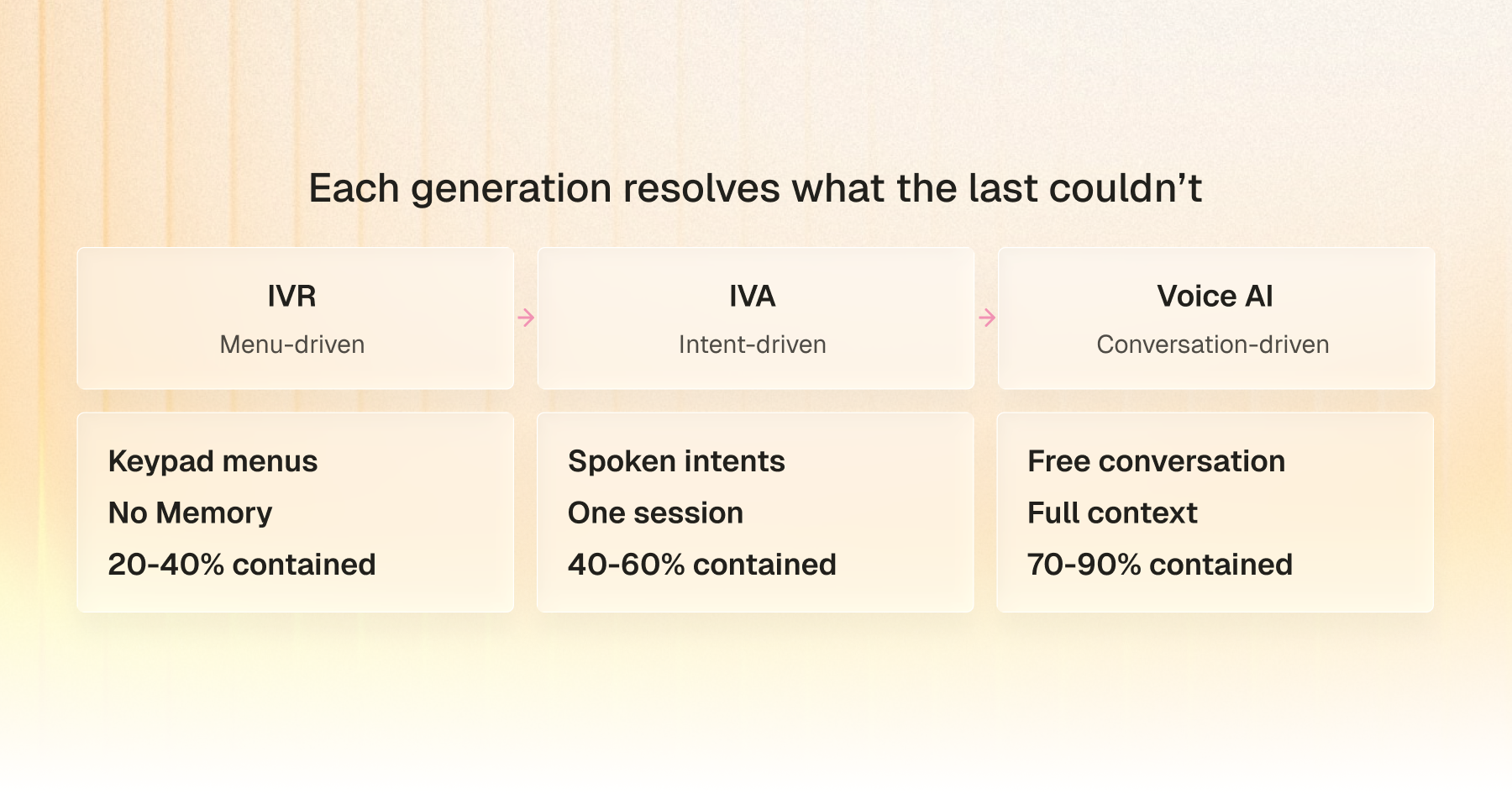
The row that matters most is containment. There's a lot of volume to capture: McKinsey's analysis of millions of interactions across more than 30 organizations found that 50 to 60% of customer contacts are still transactional, which means that callers already know what they want out of a phone interaction. The exact routine calls that voice AI is built to handle. Gartner projects that agentic AI will independently handle four in five common service issues by 2029, trimming operating costs by 30%.
So what actually sets them apart? Here is each one, oldest to newest.
What is IVR (Interactive Voice Response)?
IVR is the traditional legacy method of automating calls and voice responses. If you've ever heard "Press 1 for English," you've used it.
- How does a traditional IVR system work?
An IVR is a decision tree on a phone line. The caller hears a prompt, presses a digit, and a rule engine routes them to the next branch. There's no understanding involved, just a fixed phone tree. It's a rigid version of a switchboard operator that uses keypad input to route a call.
- What are the core features of an IVR system?
Three pieces do all the work. DTMF (Dial Tone Multi Frequency) turns key presses into signals that the system can read. Pre-recorded menus deliver the scripted prompts. Call routing sends each caller to the right queue. Some newer IVRs add basic speech recognition, but the core hasn't changed since the early 1990s.
- Common IVR use cases in call centers
IVR works well for narrow, predictable tasks: balance checks, bill payments, appointment confirmations, refills, and simple transfers. If a caller's intent fits in three to four options, IVR handles it.
- Where legacy IVR falls short
IVR can't understand natural speech, has no memory, and can't reason past its script. The moment a caller goes off-menu, the system loops back or defers to a human. Gartner found that only 14% of service issues are fully resolved through self-service, and that gap is why "Press 0 for operator" became the standard workaround.
What is an IVA (Intelligent Virtual Assistant)?
An Intelligent Virtual Assistant is an AI-powered voice system that understands spoken language and responds based on what the caller wants to do.
It replaces keypad menus with conversation using speech recognition and Natural Language Processing.
- How do IVAs use NLP and speech recognition?
An IVA combines three components. ASR (Automatic Speech Recognition) turns speech into text. An NLP engine matches that text to an intent, such as "check_balance" or "schedule_appointment." A scripted workflow tied to that intent then runs and replies through text-to-speech.
- What can an IVA actually do?
Callers use their own words instead of memorizing a menu. IVAs recognize repeat callers, tell similar intents apart, support more languages, and hand off to human agents with a transcript so the caller doesn't have to repeat themselves.
- Typical IVA use cases in contact centers
Regulated, workflow-heavy industries adopted IVAs first. Banks use them for balances and fraud alerts, insurers for claims and renewals, telecoms for plan changes, and healthcare for appointments. Anywhere intent falls into a finite list, IVAs perform well.
- Where do IVAs still fall short?
Here's the limitation most vendors gloss over: an IVA's response layer is still scripted. The NLP correctly identifies what the caller wants, but the reply is pulled from a pre-built flow. Ask something outside that flow, like "Why is my bill higher this month?", and the IVA either stalls or transfers the call.
It handles the textbook cases well and struggles with everything else. It also carries ongoing maintenance overhead, since every change to your products or pricing requires retraining.
What is voice AI?
Voice AI replaces the menu with conversation. It doesn't rely on rule engines or intent classifiers. It uses a large language model to understand each call and respond naturally, the way a capable agent would.
- What's inside a voice AI agent?
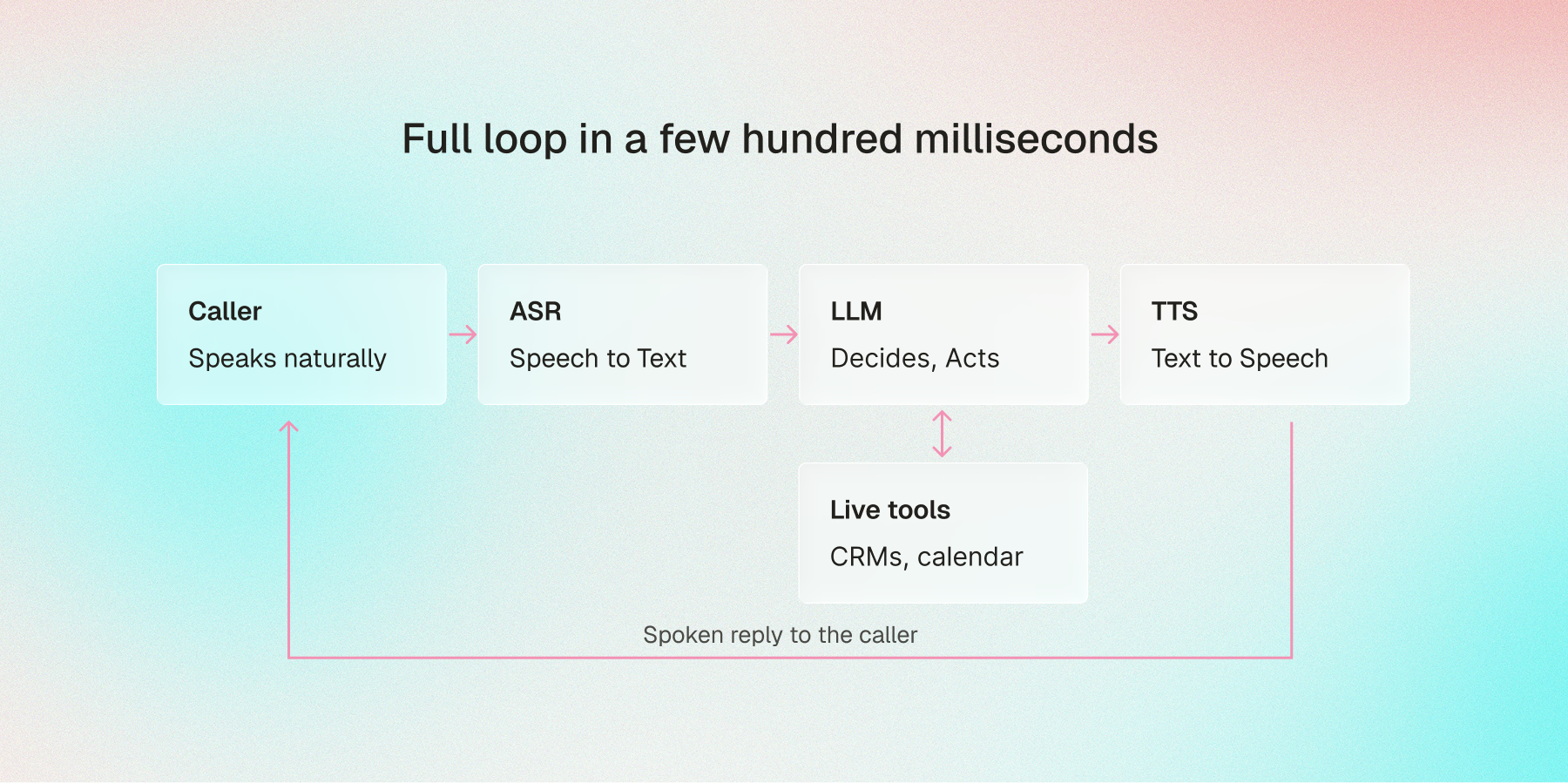
The stack has three main parts:
- Automatic Speech Recognition (ASR): transcribes the caller's speech into text in real time, with low latency.
- Large Language Model (LLM): reads the full conversation, chooses the best response, and connects to tools like your CRM, calendar, and payment systems mid-call.
- Text-to-Speech (TTS): converts the AI's response back into a natural-sounding voice.
- Why does latency matter so much?
This is the detail most articles skip. In a live conversation, even a half-second delay reads as a dropped line, and the caller starts talking over the system. For voice AI to feel human, the full ASR-to-LLM-to-TTS pipeline has to respond in a few hundred milliseconds. Get it wrong, and even accurate answers feel robotic.
Worth knowing: The natural pauses and turn-taking you hear in good voice AI are engineered, not accidental. Latency-aware models add the small cues that tell a caller they're being heard rather than processed, which is most of what separates a modern agent from an older speech-enabled menu.
- What makes voice AI different from IVR and IVA?
IVR matches button presses. IVA matches phrases to intents. Voice AI reasons. It holds context across the whole call, handles interruptions, adjusts tone when a caller is frustrated, and generates a fresh response each time. It also acts during the call: it books the appointment, sends the confirmation, and updates the CRM before the caller hangs up.
- Where is voice AI replacing traditional bots?
It's moving quickly into a few clear roles: AI receptionists fielding calls 24/7, outbound agents qualifying leads, schedulers for clinics and home services, and tier-one support across dozens of industries. Work that used to require a person can now run end-to-end.
Once a caller talks to a voice AI that understands them, a standard phone menu feels outdated. Voice has become a brand signal, much as mobile apps did a decade ago.
What does it really cost to switch?
The biggest hurdle usually isn't the AI. It's the data behind it. If your CRM is inconsistent, the voice AI will surface those gaps on live calls. Before you switch, confirm that the endpoints behind "Check balance" or "Book appointment" are clean, documented, and return the fields you expect. A model can reason well and still sound broken if the data it pulls is wrong.
Before you go live: Run a quick data-readiness check. Pull ten recent records by hand and confirm that names, appointment slots, and account statuses match reality. Fix the source data first, because the AI can't correct a record that's wrong in the system.
The pricing picture has changed. Modern voice AI bills per minute or per call, with setup measured in hours to days rather than the six-figure, multi-month projects of five years ago. Most teams see positive ROI within the first quarter.
When does IVR, IVA, or voice AI make sense?
None of these is "best" in isolation. The right choice depends on your call mix.
- When IVR still works for simple routing
Stick with IVR when volume is low, queries are predictable, and upfront cost is the priority. Good fits: utility bill lines, clinic reminders, internal IT help desks, and PIN-reset hotlines.
- When an IVA is the right middle ground
IVA fits regulated industries where exact compliance wording matters, and intents live in a known list. Banks, insurers, and large health systems often land here, moving off menus without committing fully to generative AI on day one.
- When voice AI delivers the best ROI
Voice AI wins when volume outpaces hiring, you need round-the-clock coverage, calls are open-ended, or customer experience is a real differentiator. The old enterprise-only price barrier is gone.
- How should you choose? Ask four questions
- How many of your calls are simple routing or FAQ? Over 80%, IVR or IVA may carry you. Under 50%, you need reasoning.
- What's your current containment rate? Around 30%, voice AI pays for itself quickly.
- How often do your products change? Voice AI updates through prompts and knowledge bases. IVR and IVA need rebuilds.
- What does a bad call actually cost you? In high-value industries, one frustrated caller can erase a year of IVR savings.
Are IVR and IVA becoming obsolete?
Neither is obsolete yet, but neither is the default choice anymore. With voice AI now affordable, scalable, and genuinely conversational, the question isn't if you upgrade. It's when and how.
A reasonable prediction: within 24 months, standard IVR settles into utility status. Fine for paying a water bill, but a liability for any brand in a competitive market like e-commerce or real estate.
- Why is voice AI replacing IVR so quickly?
Five years ago, conversational AI meant a six-figure budget and months of integration. Today, it stands up in hours, bills per call, and plugs into your existing phone number. After one good experience, callers stop tolerating the menu.
- Do you have to choose between AI and human agents?
No, and the strongest deployments don't. They run hybrid. A 2025 Gartner poll of 163 customer service leaders found that 95% plan to keep human agents and use AI for routine volume. McKinsey reaches the same conclusion, recommending a balanced approach that pairs AI with human agents rather than replacing them.
That balance is what platforms like Phonely are built around. The AI resolves the calls it can, and routes the rest to your team with a full transcript, so nobody starts from scratch.
Industry use cases for voice AI over IVR and IVA
Here is where voice AI delivers the most impact, and the containment lift each industry typically sees versus traditional IVR.
- Healthcare: appointment booking and intake
Clinics use voice AI to handle bookings, reschedules, and refills around the clock. More advanced setups manage basic patient intake for doctor review, which frees nurses for direct patient care.
- Insurance: claims, renewals, and FNOL
First Notice of Loss is difficult to automate with IVR because claimants are stressed and unpredictable. Voice AI holds the empathetic back-and-forth while still capturing clean, structured claim data. Better experience, better data.
- E-commerce and retail: order status and returns
"Where's my package?" is close to an ideal voice AI call. Clear intent, clean data, one direct answer. Containment routinely sits above 80%.
- Real estate: lead qualification and property inquiries
What we see in the field: leads calling about a listing tend to go cold if they aren't answered within about 90 seconds. Voice AI isn't only about answering. It's about capturing that high-intent moment a human receptionist might miss while on another line. Speed to lead is a real differentiator.
A voice AI receptionist answers instantly, qualifies the lead, books the showing, and logs everything to the CRM, often before the agent even sees the missed call.
- Financial services: account support and fraud checks
Banks use voice AI for card activation, disputes, and fraud verification. It authenticates the caller, pulls transaction history, and walks through verification in compliance-grade language, which matters most when the caller is already nervous.
How Phonely helps you move beyond IVR and IVA
Phonely is a voice AI platform for businesses that have outgrown menus and scripts. Here's how it maps to the gaps above.
- Voice AI agents built for real conversations
Low latency, expressive delivery, graceful interruption handling, and a tone that shifts mid-call. Choose from 1,000+ voices across 100+ languages and accents, or clone your own.
The results show up in production. Etech Global Services reports a 72% cost reduction and a 34% lift in first call resolution. TSA Group, with 4,500 agents on staff, says Phonely's agents resolve calls better than their best people.
- Build, train, and act without code
Map call flows in a visual drag-and-drop builder: greetings, transfers, qualification, escalation, no code. Train the agent on your FAQs, documents, or website so it answers from your own content. When something changes, you edit a prompt instead of rebuilding a menu.
During the call, Phonely acts through prebuilt integrations: booking appointments, updating records, and sending confirmations in real time. For legacy tools without an API, browser-based automations keep them in the workflow.
- Migrate without a rip-and-replace
Phonely connects to your existing phone system and call flows, so you migrate one call type at a time, after-hours, FAQs, and bookings, without touching the rest. Around 70% of businesses go live in under five minutes; enterprise rollouts come with a dedicated team.
- Analytics and compliance built in
Every call returns an AI summary, a sentiment score, and an intent tag. Build reports in-platform or pipe the data into your monitoring tools. Phonely meets SOC 2, HIPAA, CCPA, and PCI across phone, SMS, and email, the baseline for healthcare and financial services.
Your migration checklist
Before you switch, run through this:
- [ ] Pull your last 30 days of call logs and tag how many are simple routing or FAQ
- [ ] Calculate your current containment rate as a baseline
- [ ] Audit the CRM and API endpoints behind your top three call types for clean, accurate data
- [ ] Pick one low-risk call type to migrate first (after-hours or FAQ)
- [ ] Set escalation rules so complex calls route to a human with a transcript
- [ ] Define the metrics you'll watch: containment, CSAT, cost per call
- [ ] Review the first week of transcripts and tune the prompts