.jpg)
Key takeaways
- AI call routing works by analyzing each call in real time through six steps: greeting, intent analysis, data lookup, destination scoring, context passing, and post-call automation.
- The biggest shift is from routing to resolving. 93% of customers expect first-call resolution, and AI voice agents can deliver it for appointment booking, order status checks, and FAQ-style questions without a human queue.
- Six routing types work together on every call: skills-based, intent-based, VIP, sentiment-based, time-based and overflow, and self-service resolution.
- With Phonely, 70% of businesses go live in under 5 minutes and report up to 80% reduction in operational costs.
- Post-call analytics close the loop. AI cuts the 6-minute average wrap-up per call to zero and turns every interaction into data that sharpens the next routing decision.
- Security is a qualifying question. Any platform handling customer calls should meet SOC 2, HIPAA, GDPR, CCPA, and PCI compliance before anything else.
The fastest way to lose a customer isn't a bad product. It's making them repeat their problem to three different people before anyone can help. 72% of customers say that explaining their problem to multiple people is poor customer service. The cost of that friction is measurable. Companies that resolve problems on the first interaction cut churn by up to 67%. Most businesses don't fail at customer service because the problem was hard to solve. They fail because the caller never reached the right person. That's a routing problem, and it's exactly what AI call routing is built to fix.
Traditional routing pushes every caller through the same static menus and first-available queues. AI call routing replaces that with real-time decision-making: the system identifies intent, pulls customer data, and matches each call to the fastest resolution path before the caller finishes their first sentence.
By the end of this guide, you'll know how to evaluate AI call routing for your business, choose the right routing types for your call volume, and set up a system that resolves most calls before they ever reach a human queue.
What is AI call routing?
AI call routing analyzes incoming calls in real time and directs each one to the best available destination: a human agent, an AI voice agent, or an automated workflow. Instead of static IVR menus and fixed queues, it uses caller intent, conversation history, agent skills, and system availability to make the routing decision.
Here's what changes compared to traditional routing. Legacy IVR systems ask callers to self-classify through numbered menus. AI call routing inverts that.
Traditional routing vs. AI call routing
93% of customers expect their issue to be resolved on the first call, and every 1% improvement in first call resolution lifts CSAT by 1% and NPS by 1.4 points. The global call center AI market reflects that urgency, growing from $2 billion in 2024 to a projected $7.08 billion by 2030.
The real shift is whether a call needs routing at all. When an AI voice agent can greet the caller, verify identity, resolve the issue, and log everything to the CRM in a single conversation, routing becomes a fallback. The system still evaluates every call. It just determines that the AI agent is the best destination for most of them.
AI call routing in 2026 is about resolving more calls before a queue is ever needed.
How does AI call routing work?
Most explanations of AI call routing stop at three steps: collect data, analyze it, and route the call. That covers the basics, but it skips what actually matters to the caller and the business.
Call Routing and Escalation in Phonely
Here's what the full process looks like when intelligent call routing is handled end-to-end:
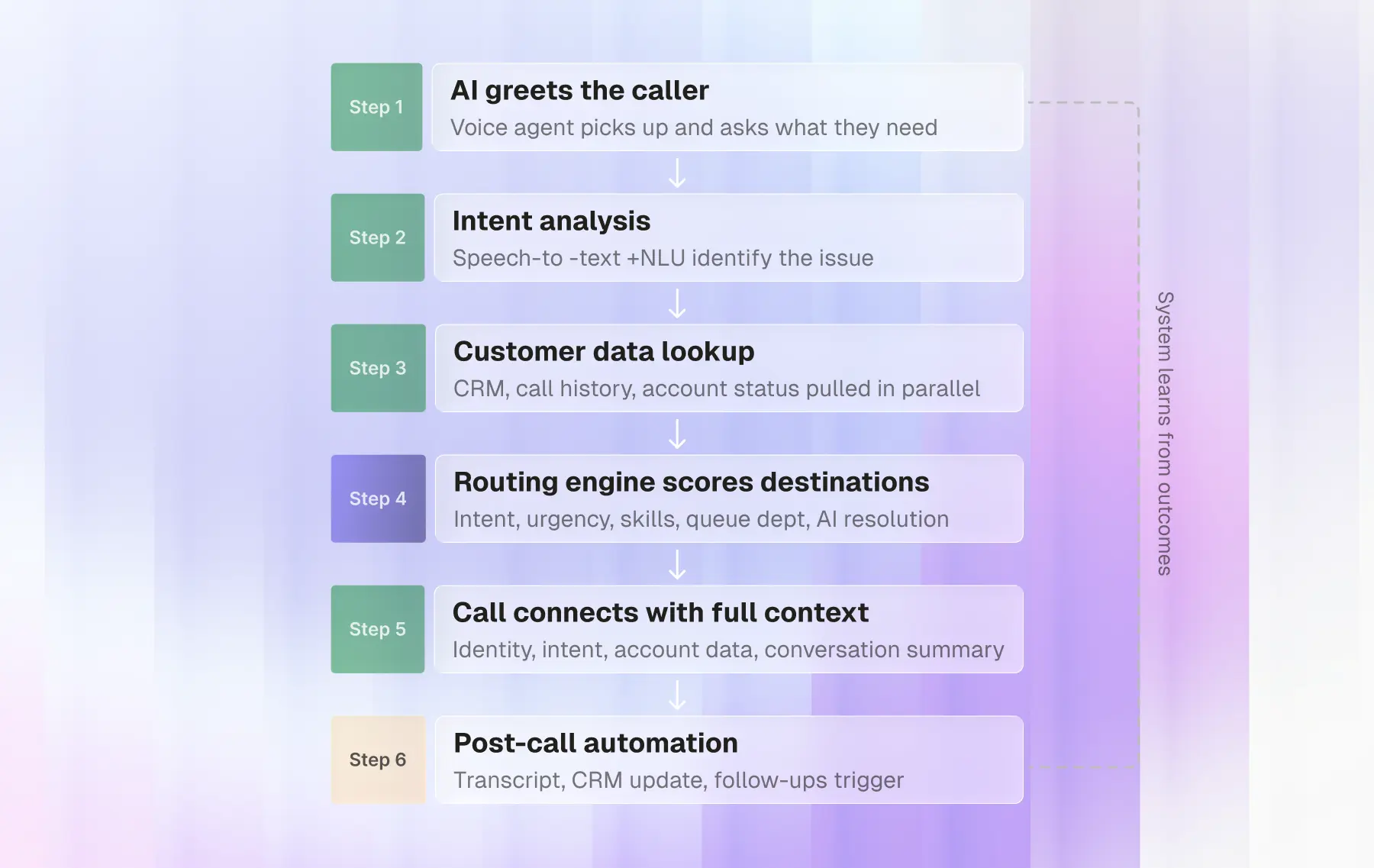
Step 1: The AI greets the caller and opens the conversation
The AI voice agent picks up, introduces itself, and asks the caller what they need in plain language.
This replaces the traditional IVR entirely. The caller speaks naturally, and the conversation starts the way it would with a human receptionist. Phonely's infrastructure delivers sub-second latency, so there's no awkward pause between the caller speaking and the AI responding.
Step 2: Speech recognition and intent analysis identify the issue
As the caller speaks, the system converts speech to text in real time and runs it through natural language understanding to determine intent.
The system interprets meaning regardless of how the caller phrases it. "I got charged twice" and "there's a duplicate on my statement" both route to the same place. It also reads tone and urgency, flagging frustrated or distressed callers for priority handling.
Step 3: Customer data lookup enriches the context
Once intent is clear, the system pulls relevant data from connected platforms: CRM records, past call history, account status, and open tickets.
This lookup runs in parallel with the conversation. By the time the routing decision is made, the system already knows who the caller is, what they've called about before, and what's currently unresolved.
Step 4: The routing engine scores and matches the best destination
This is where AI call routing separates from traditional systems. The engine scores every possible destination based on intent, urgency, caller value, agent skill match, current queue depth, and whether the AI itself can resolve the issue without a transfer. For many call types, like appointment scheduling, order status checks, or FAQ-style questions, the AI agent is the best destination.
According to McKinsey research, generative AI-enabled agents achieve a 14% increase in issue resolution per hour and a 9% reduction in handle time. Smarter matching is a big part of why.
Step 5: The call connects with the full context passed forward
If the call routes to a human agent, every piece of context travels with it: the caller's identity, their intent, relevant account data, and a summary of what was already discussed.
The agent sees everything from the first word. The conversation picks up where the AI left off, and the caller never repeats themselves.
Step 6: Post-call logging, CRM updates, and follow-ups trigger automatically
After the call ends, the system logs the transcript, generates a summary, updates the CRM, and triggers any follow-up workflows. That might be a confirmation text, a scheduled callback, or an internal ticket routed to another team.
Industry benchmarks put the global average for post-call wrap-up at 6 minutes per call. For a team handling 500 calls a day, that's 50 hours of agent time spent on notes, CRM updates, and follow-ups. When AI handles that automatically, those hours go back to the floor.
This six-step cycle runs on every call. With each interaction, the system logs which routing decisions led to the fastest resolutions. Over weeks, calls that once required escalation start resolving on the first attempt, and the AI handles a growing share of them without human involvement.
What are the main types of AI call routing?
AI call routing systems rarely rely on a single method. Most combine several routing types at once, scoring each call against multiple criteria before making a decision. These are the six routing types used in real deployments:
AI call routing types at a glance
- Skills-based routing matches callers to agents based on verified expertise.
A billing dispute goes to a billing specialist, a technical issue goes to an engineer. The system tracks agent certifications, resolution history, and performance by category to make the match.
- Intent-based routing uses natural language understanding to determine what the caller needs from their own words.
The system classifies intent in real time and routes the call before the caller finishes explaining.
- VIP routing assigns weight based on caller value, account tier, or contract terms.
High-value customers or time-sensitive issues skip the general queue and connect to dedicated teams. According to Salesforce research, 73% of customers expect better personalization as technology advances. VIP routing is one of the most direct ways to deliver that at scale.
- Sentiment-based routing monitors tone, word choice, and vocal patterns during the conversation.
A caller who sounds calm, asking about a billing statement, gets standard handling. A caller who sounds distressed about an unexpected charge gets escalated immediately.
- Time-based and overflow routing direct calls based on business hours, agent availability, and volume thresholds.
During off-hours or sudden surges, calls route to AI voice agents instead of hitting voicemail. 56% of customers say they often have to repeat information across interactions. AI-powered overflow routing prevents that by capturing every detail, so follow-up the next day starts with full context.
- Self-service resolution before routing is the type most traditional systems skip entirely.
If the AI voice agent can resolve the issue on its own, like booking an appointment, checking an order status, or answering a policy question, the call never enters a queue.
The caller gets their answer, and the line is free. This is where AI call routing's "resolve or route" model has the biggest impact on cost and capacity.
Most deployments layer these routing types together. The system scores each call against multiple criteria at once and picks the fastest resolution path. Phonely lets you configure all six from a single visual interface.
How do you set up AI call routing with Phonely?
Most teams budget weeks for setup. With Phonely, 70% of businesses go live in under 5 minutes. Here's how:
Step 1: Build your routing logic in the visual flow builder
Phonely's visual flow builder lets you design call workflows without writing code. You map out conversation paths, set routing rules, and configure transfers using a drag-and-drop interface. Your team can build and launch workflows without waiting on engineering.
Step 2: Connect your CRM, calendar, and phone system
Phonely integrates with your existing tools for real-time appointment booking, CRM updates, and more. You can connect software that has an API directly, or use Phonely's prebuilt browser-based automations for tools that don't. Once connected, every call pulls live customer data automatically.
Answering over 10,000 a Calls Day with Phonely
Step 3: Train the agent on your knowledge base
Upload your documentation, FAQ pages, or product guides, or simply connect your website. Phonely's AI learns your business from the source material you provide and uses it to answer caller questions accurately, in context, and in over 100 languages. A well-built knowledge base means the AI resolves more calls without human involvement.
Step 4: Launch and scale with post-call analytics
Once live, Phonely generates AI summaries, sentiment analysis, and detailed call transcripts after every conversation. You can build custom reports inside the platform or pipe them into your existing monitoring tools. Every call becomes a data point that makes the next routing decision sharper. Businesses using Phonely report up to 80% reduction in operational costs.
How does AI call routing protect customer data?
AI call routing runs on customer data. Every call involves names, account details, conversation history, and sometimes payment or health information. The system needs that data to route intelligently, but the business needs to know it's handled with the same care a human agent would give it.
Phonely is built for this. The platform supports SOC 2, HIPAA, GDPR, CCPA, and PCI compliance, with protection extending across voice, SMS, email, and API channels. Call recordings and transcripts are encrypted at rest and in transit. Access is role-based and auditable. Data retention and deletion policies are configurable to match your compliance requirements.
This matters most for businesses in regulated industries. Healthcare providers need HIPAA-grade security before they can deploy any voice AI. Insurance and financial services teams need audit trails and access controls that hold up under scrutiny. Phonely was built to meet those standards from the ground up.
For businesses evaluating AI call routing, security should be a qualifying question, not an afterthought. If the platform can't meet your compliance requirements, nothing else it does matters.
Route every call with Phonely
AI call routing works best when the routing logic, integrations, knowledge base, and analytics all live in one place. That's what Phonely is built to do.
Set up your routing in minutes. Connect your CRM and calendar. Train the AI on your business. Let post-call data make every call after that one better.
10,000+ businesses already use Phonely across voice, chat, SMS, and API. Your first 100 minutes are free.
Frequently asked questions
Can AI call routing fully replace IVR menus?
Yes. AI call routing eliminates the need for numbered menus entirely. The AI voice agent listens to what the caller says, identifies their intent, and routes or resolves the call. Most businesses that switch from traditional IVR to AI-powered routing see fewer abandoned calls and higher first-call resolution because callers reach the right destination without navigating a menu tree.
How long does deployment take?
With Phonely, 70% of businesses go live in under 5 minutes using the no-code visual flow builder. You upload your knowledge base, connect your tools, and launch.
Enterprise deployments with complex workflows, custom integrations, or multi-location routing take longer. Phonely's team works directly with enterprise clients to configure, test, and optimize before going live.
What happens when the AI routes a call incorrectly?
Misroutes happen, especially early in a deployment. With AI call routing, every call is logged with full context: the detected intent, the routing decision, and the outcome. If a call lands in the wrong place, the receiving agent can flag it, and the system uses that feedback to improve future decisions.
Phonely also includes manual override options so agents can reroute calls in real time without the caller having to call back. Routing accuracy improves with every interaction as the model learns from real call data.