Key takeaways
- To choose an enterprise conversational AI platform, score vendors against seven criteria, pilot your top two or three on real customer calls, and model 12-month total cost before signing.
- The hardest integration problem isn't APIs. It's the legacy system without one. Browser-based automation decides whether a platform deploys as-is or needs engineering work first.
- Vendor demos show platforms in their best light. Real customer pilots, ideally calls diverted from your live queue, show how they actually perform.
- Compliance gaps that look minor in evaluation become deal-breakers at legal review. "HIPAA-compliant" and "HIPAA-ready" mean different things.
- Headline pricing rarely reflects real cost. Build a 12-month total cost of ownership (TCO) model. The cheapest per-minute rate often isn't the cheapest at production volume.
- Phonely is built for enterprise voice: 100+ voices, 100+ languages, browser-based integrations for any tool, and SOC 2, HIPAA, CCPA, and PCI compliance.
What to look for in an enterprise conversational AI platform
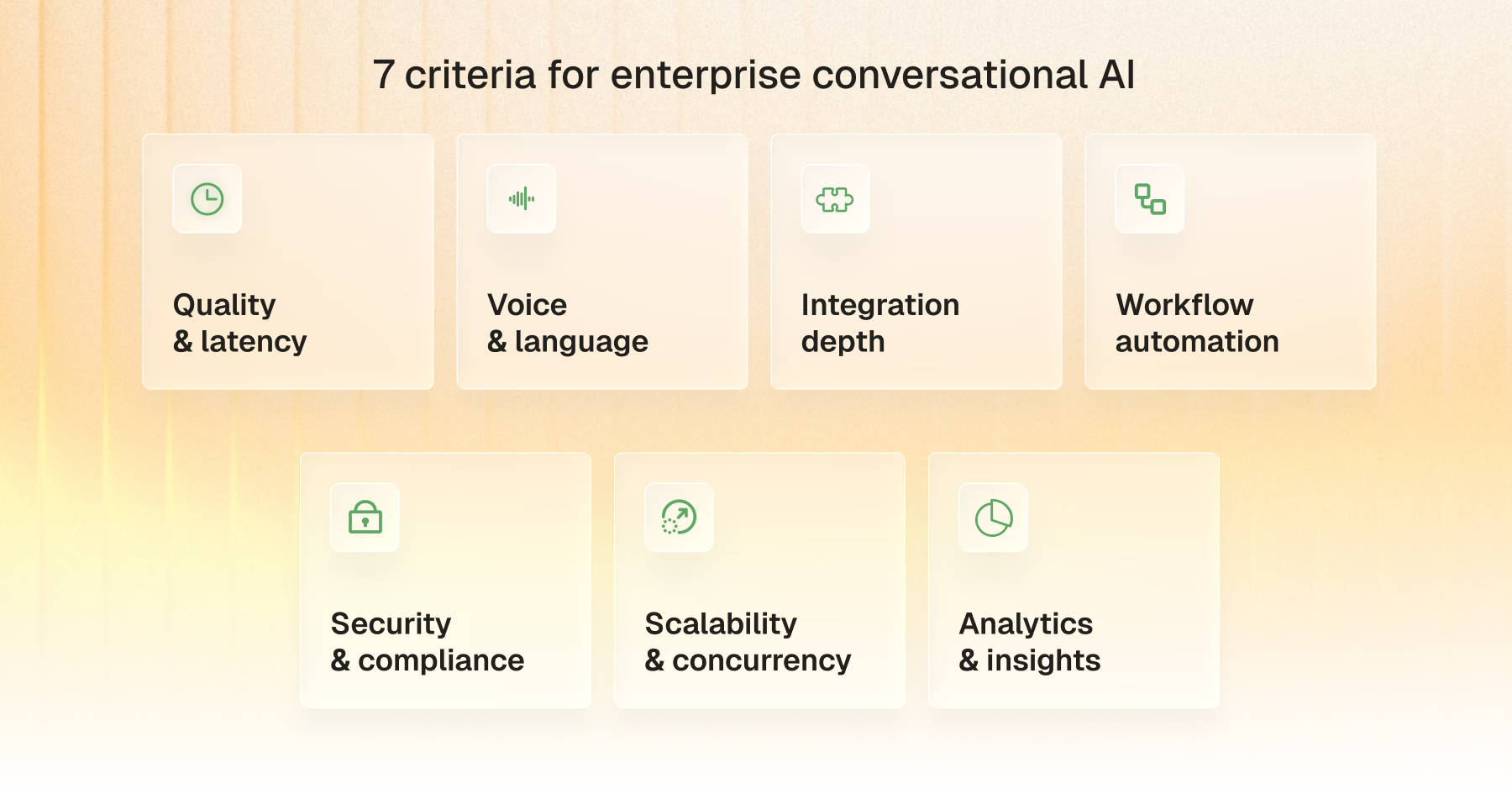
What separates a platform that scales from one that stalls is a smaller set of dimensions: how naturally it talks, how widely it integrates, how it handles compliance, and whether it bends or breaks under load. These are the seven criteria that matter:
- Conversational quality and latency
Conversational quality is what stops a customer from saying "agent" the moment a bot picks up. Two factors drive it: how naturally the AI handles turn-taking, interruptions, and accent variation, and how fast it responds.
The ITU-T G.114 standard recommends keeping one-way voice latency under 150 milliseconds for high-quality interaction. Human conversation runs even tighter. PNAS research finds that response times under 250 milliseconds happen too quickly for conscious thought. Production voice AI generally needs to land under one second end-to-end to feel alive.
The right way to test this is on real customer calls, not scripted demos. Most platforms perform well on rehearsed dialogue and degrade on live, messy calls with overlapping speech and background noise.
- Voice, language, and accent coverage
Enterprise deployments rarely run in one language. They almost never run in one accent. A platform that handles American English crisply but stumbles on Australian English, Indian English, or European Spanish is not enterprise-ready. Look for native support across the languages and regional accents your customers actually use, not the ones a vendor lists in marketing copy.
Voice cloning matters more than buyers realize. Using one brand voice across IVR, marketing videos, and customer support builds recognition. Switching voices across channels erases it. And test it on your callers' real accents, not the demo team's.
- Integration depth, including tools without an API
In enterprise software, the integration that quietly kills deployments is the one with no API at all. Legacy CRMs, scheduling platforms, payment processors, and internal tools often expose nothing beyond a UI. Platforms that can integrate via API leave those legacy systems stranded.
Look for browser-based automation alongside API integrations, so the AI can interact with any tool a human agent uses. Test integration depth on the system that's actually causing the most pain, not on the textbook examples that every platform handles.
- Workflow automation and task execution
A conversational AI platform that can talk but can't act is incomplete. The real test is whether it can execute multi-step workflows during a live call: looking up an order, processing a return, scheduling a follow-up, transferring a verified caller to a specialist, all without dropping context.
McKinsey's State of AI 2025 found that 62% of organizations are at least experimenting with AI agents and 23% are scaling them somewhere in their enterprises. But in any single business function, no more than 10% are scaling AI agents.
Look for visual workflow builders that non-developers can configure, conditional branching based on call outcomes, and the ability to trigger backend actions in real time.
- Security and compliance for regulated industries
Compliance is a runtime requirement, not a checkbox. Healthcare, finance, insurance, and government deployments need the platform to actively manage PII handling, redaction, audit logs, and data residency during the call. The IBM Cost of a Data Breach Report 2025 puts the global average breach cost at $4.44 million, with healthcare at $7.42 million for the twelfth consecutive year and US breaches at a record $10.22 million.
Look for SOC 2 attestation, HIPAA compliance with a Business Associate Agreement (BAA), and PCI DSS validation at a minimum, plus configurable data handling rules per call type. Ask vendors how they handle retention, encryption at rest, and breach notification. Generic compliance pages usually fall apart under specific questions.
- Scalability and call concurrency
Most platforms handle modest call volumes without strain. The real test arrives during peak demand: holiday season for retail, enrollment windows for healthcare, and end-of-quarter for financial services. Platforms that throttle, queue, or degrade quality under load will leak customers exactly when retention matters most.
Look for unlimited concurrency as a baseline, transparent latency benchmarks at scale, and infrastructure that auto-scales without human intervention. The vendor should be able to show you load test data from real enterprise deployments, not theoretical capacity numbers.
- Analytics and post-call insights
Conversation data is the most underused asset in enterprise customer operations. A serious platform records every call, transcribes it, classifies it, and generates structured insights that feed back into both the AI's performance and broader business decisions. Deloitte's 2024 Global Contact Center Survey found that top-performing contact centers are 2.7x more likely to invest in analytics than less advanced peers, a sign of how strategic the analytics layer has become.
Look for AI-generated summaries, sentiment analysis, intent classification, and exportable structured data. The strongest platforms surface aggregate patterns that human teams would never spot at scale: emerging customer issues, common deflection failures, and cohorts that resolve without escalation.
How to choose a conversational AI platform in 5 steps
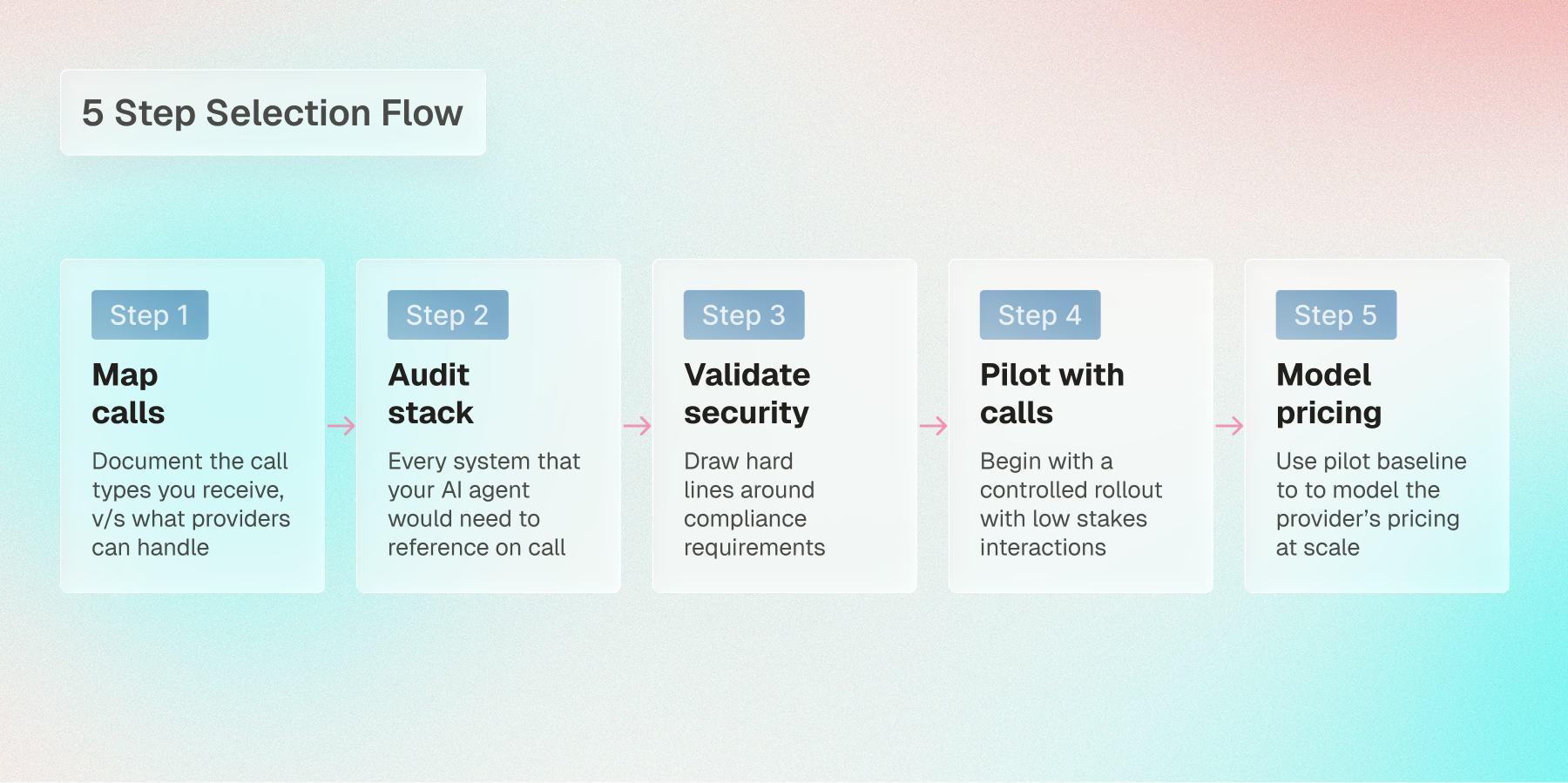
The seven criteria above explain what to evaluate. The five steps below turn evaluation into a process you can run with stakeholders, vendors, and your own team before signing anything.
Step 1: Map your highest-volume conversations
Before evaluating platforms, document what your AI platform will actually handle. Pull 90 days of call or chat logs. Categorize by purpose: inbound support, outbound sales, appointment booking, payment collection, lead qualification, and follow-up. Rank by volume. The ranking determines which features matter most.
A platform that handles 95% of appointment bookings flawlessly but stumbles on payment collection is a problem if payments are 30% of your call volume. End this step with a written list of your top three to five conversation types in priority order. That list becomes the spec you evaluate every vendor against.
Step 2: Audit your existing tech stack
List every system your AI agent will read from or write to: CRM, scheduling, payment processor, ticketing, knowledge base, and ERP. For each one, note whether it has a public API, webhook support, or neither. Then ask each vendor whether they have a pre-built integration for that specific system, not just for the category.
Most platforms claim broad integration but actually support a handful of named tools natively. The rest require custom development. If your stack includes a legacy CRM without an API, ask vendors specifically how they handle that case. The honest answer separates platforms that can deploy as-is from platforms that need an engineering project first.
Step 3: Pressure-test security and compliance
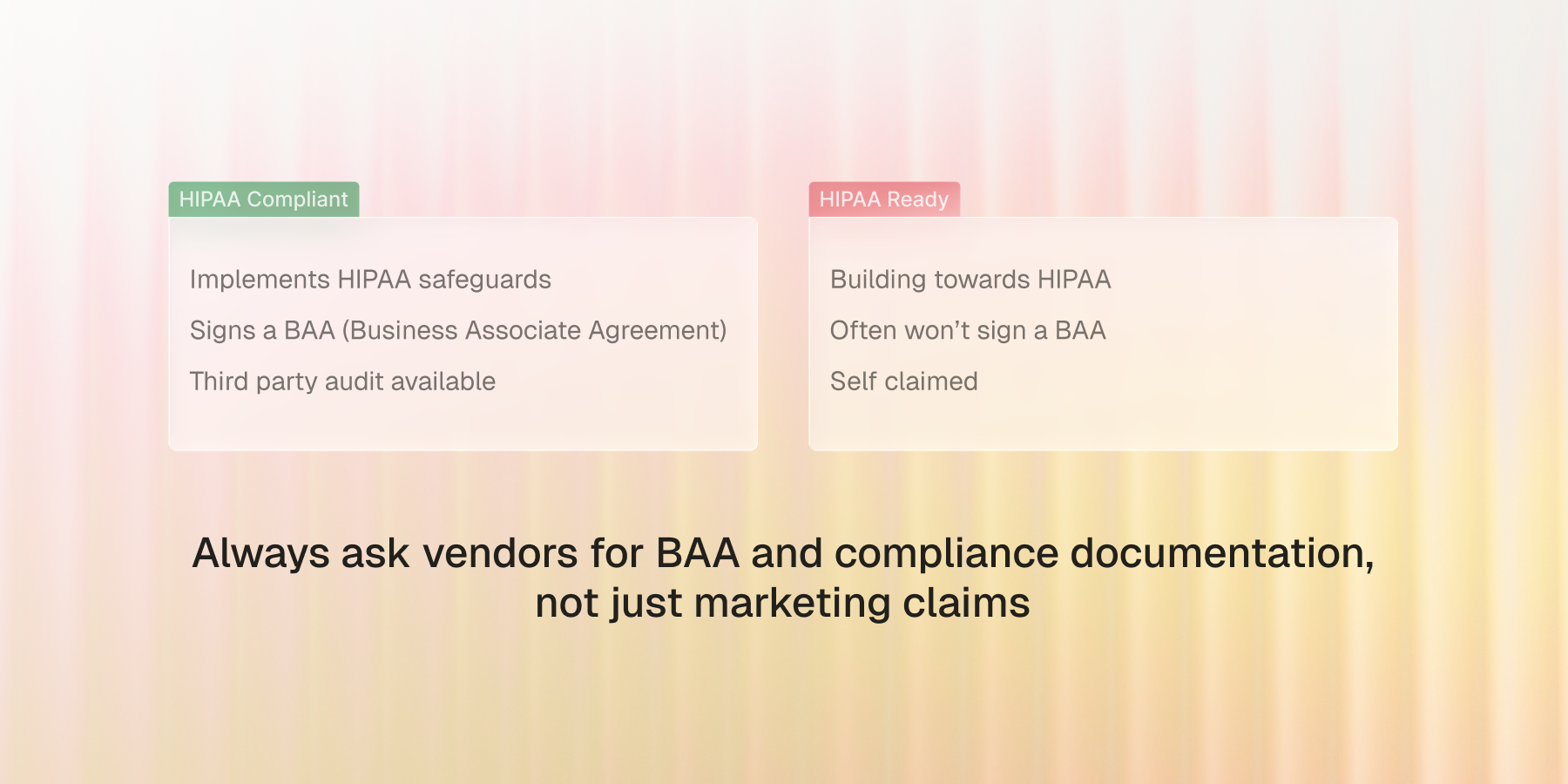
List your hard compliance requirements before talking to vendors: SOC 2, HIPAA, PCI, CCPA, ISO 27001, EU AI Act, and others that apply to your industry. For each candidate platform, ask for actual compliance documentation, not marketing claims.
There's a meaningful difference between "HIPAA-compliant" and "HIPAA-ready". A HIPAA-compliant vendor has implemented HIPAA's required safeguards and will sign a Business Associate Agreement (BAA). "HIPAA-ready" typically means the platform hasn't been audited or won't sign a BAA without additional work.
Confirm whether the compliance you need is included in the plan you're evaluating or gated behind an enterprise tier. Confirm data residency options for your region (US, EU, on-prem). A gap that looks like a footnote during evaluation turns into a blocker the moment the legal team asks for the paperwork.
Step 4: Pilot on real customer conversations
A demo is a controlled environment; a pilot is the real one. Finalists that looked identical in a sales call separate fast once they're taking actual customer traffic. Set up parallel pilots with one to three finalists. Use real customer scenarios, ideally calls diverted from your live queue rather than scripted tests. Measure conversation quality, integration reliability, and customer satisfaction across at least two to three weeks to capture variance.
Phonely is set up for fast pilots: free production minutes to test on live traffic, no sales call required to start. Most enterprise CAI platforms gate pilot access behind a sales conversation, which is fine but adds weeks to the timeline.
Step 5: Model pricing against real volume
The number on the pricing page is almost never what you end up paying. Voice AI pricing typically falls into three patterns. Layered pricing stacks separate fees for voice engine, LLM, and telephony, the way Retell's $0.07+ per minute base rate works. Per-action add-ons charge separately for transfers, SMS, and outbound attempts on top of per-minute rates, the way Bland's pricing is structured. Custom enterprise quotes require a sales conversation to model, which is how Cognigy, Sierra, and Phonely all work. Phonely's free minutes let you model real cost before booking a sales call, with a talk to sales path when enterprise terms are needed.
Take your projected monthly volume from Step 1 and apply each platform's pricing model: per-minute, per-message, outcome-based, or tiered. Add every layered cost: model inference, voice synthesis, telephony markup, per-action fees, and concurrency capacity. Model it over twelve months, not per minute. At production volume, the lowest headline rate routinely loses to a higher rate carrying fewer add-ons.
How Phonely fits enterprise conversational AI requirements
The seven criteria above describe what enterprise buyers should evaluate. Here's how Phonely answers each one, especially the dimensions where evaluation usually decides procurement.
- Voice quality and language coverage
Phonely is an omnichannel AI platform that handles voice, chat, SMS, and more from a single dashboard. The platform supports 1,000+ natural voices across 100+ languages, with voice cloning available directly from the platform.
That breadth matters most for global enterprises running calls across regions, where multi-language and accent coverage is a hard requirement, not a nice-to-have.
- Integration depth
Most voice AI platforms only connect to systems with public APIs or webhooks. Phonely adds browser-based automation that lets you connect any software, even those without an API.
That means Phonely can connect to legacy CRMs, scheduling tools, or other software in your stack that doesn't expose an API. For enterprises with older or niche software, this is what separates a platform that ships into the stack you already have from one that needs custom development to fit.
- Workflow automation
Phonely's visual workflow builder lets non-developers configure complex call flows, including handling transfers, collecting information, and triggering actions automatically. About 70% of businesses go live in under five minutes, with no coding required.
Enterprise teams that need more complex configurations get dedicated support to build and optimize at scale.
- Security and compliance
Phonely supports SOC 2, HIPAA, CCPA, and PCI compliance, with security and reliability described as foundational to the platform.
For healthcare, insurance, financial services, or any team facing regulatory scrutiny, this compliance breadth covers the standards most legal reviews ask for.
- Scalability and concurrency
Phonely is proven at production scale across 10,000+ businesses processing 100,000+ calls per day, with case studies including Etech and TSA Group showing unlimited call concurrency in deployment.
The platform serves teams from small businesses to Fortune 500 enterprises, designed to scale conversation quality at any volume.
- Analytics
Every Phonely call is transcribed automatically, then summarized, sentiment-scored, and turned into a structured report you can read in-platform or pipe into your BI stack.
For teams that want to learn from every call, the analytics close the loop on customer conversations.
Using Phonely for Enterprises
Test the platform with 100 free minutes, or talk to sales to walk through enterprise deployment.