Key takeaways
- IVR systems use rule-based routing through preset menus, while AI agents use natural language understanding to listen, reason, and respond in real conversation.
- Conversation memory and context awareness don't exist in IVR, while AI agents maintain full call history and integrate with your CRM, calendar, and payment systems in real time.
- Manual configuration and menu updates are required for IVR, while AI agents learn from conversations and improve continuously without code changes.
- When calls don't match the script, IVR transfers to departments, while AI agents reason through complex requests and handle multi-step tasks in a single conversation.
- Traditional IVR requires weeks or months to deploy, while AI agents go live instantly and refine through actual call performance.
A customer calls to reschedule an appointment. Your IVR system routes them through multiple menus. Somewhere in the navigation, they give up and hang up. Most don't call back. They cancel the appointment or book with your competitor instead. For a business handling 500 calls weekly, even a small abandonment rate adds up to dozens of lost customers.
An AI phone agent handles the same call differently. The customer says, "I need to reschedule my appointment." The agent checks your calendar, books a new slot, and sends a confirmation. AI phone agents ensure the customer gets what they called for as conveniently as possible.
IVR vs. AI phone agent: Key differences
While both IVR and AI phone agents answer calls automatically, the technology behind them and what they can accomplish are fundamentally different. Compare IVR technologies across cost, scalability, and personalization.
How IVR systems work
IVR uses speech recognition to detect keywords, then routes callers through predetermined menus. It's built for one job: moving callers to the next menu or transferring them to a human. When the call doesn't match the script, callers get stuck in loops or transferred multiple times.
How AI phone agents work
AI phone agents listen to the full context of what a caller needs, reason through ambiguous requests, and make decisions inside the conversation itself. They integrate with your CRM, calendar, and payment systems in real time. This means the agent can pull up your customer's account history, check real-time availability, process payments, and log the entire interaction automatically without ever putting the caller on hold or transferring them away.
A caller says, "I got a letter about my premium, but I never heard back about my renewal." An AI agent recognizes this as both a billing issue and a service complaint and handles both. An IVR would route to one department and miss the second problem entirely.
IVR vs AI phone agent
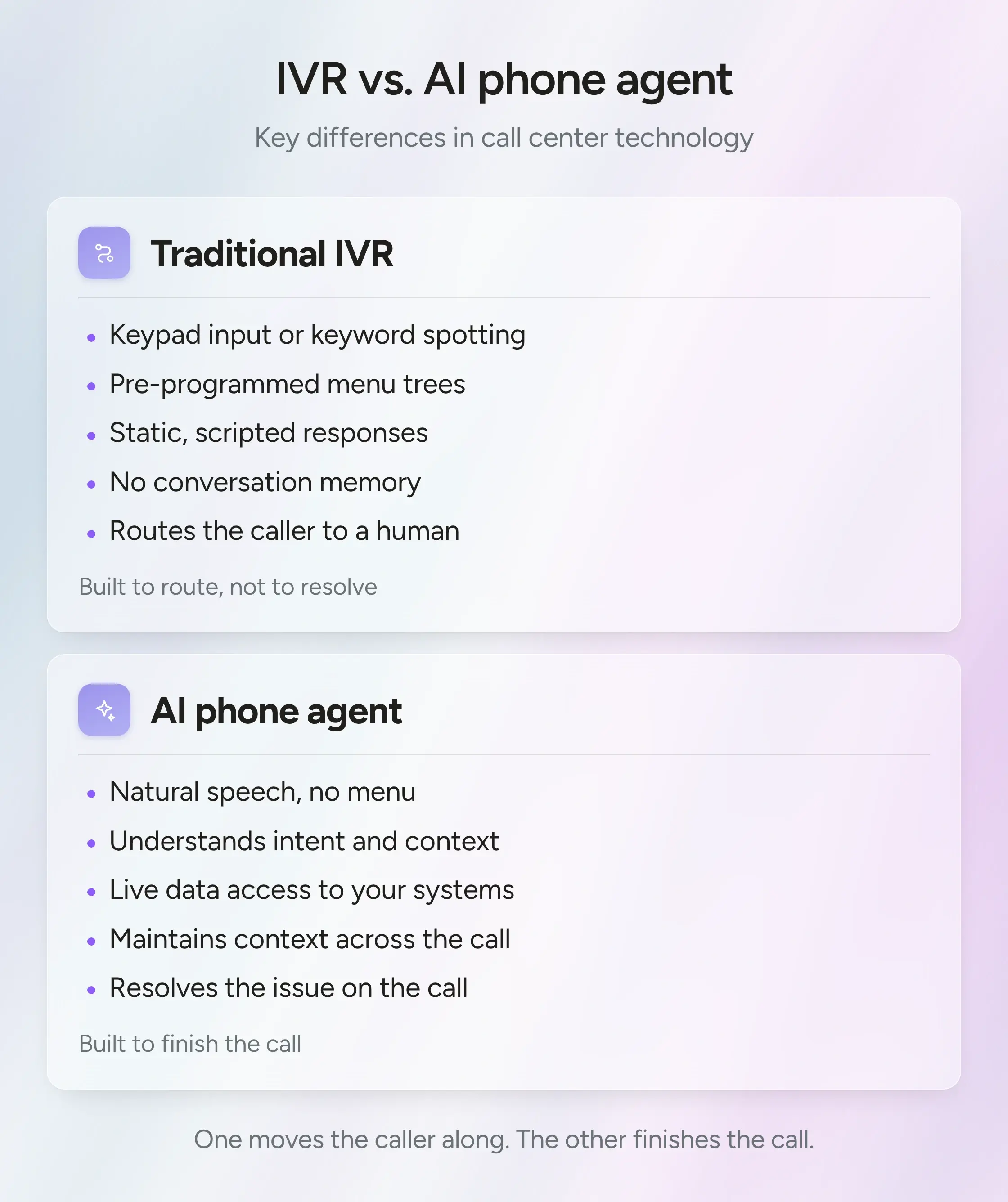
IVR was built for a world where call volume mattered more than call quality. It reduced headcount but created a new problem: callers stopped calling. AI phone agents address this by actually resolving calls instead of just routing them.
Why businesses are replacing IVR with AI phone agents
The shift from IVR to AI happens because call abandonment and routing failures directly impact revenue. Contact centers see the problem in their metrics and move to solutions that actually resolve calls. As research from Gartner shows, 85% of them explore AI solutions.
The hidden cost of call abandonment
When a caller navigates your IVR menu and hangs up, you lose the revenue from that interaction. Whether it's an appointment that doesn't get rescheduled, a payment that never processes, or a support issue that goes unresolved, every abandoned call costs you money directly to your bottom line.
Beyond the lost transaction, abandonment creates secondary costs:
- No behavioral data. You don't know why the call was abandoned or what the caller needed. You can't improve the system because you have no visibility into failure points.
- No opportunity for escalation. Most AI adoption projects require foundational work and realistic expectations rather than quick vendor promises that rarely pan out.
- Increased support volume elsewhere. Callers who abandon IVR often reach out via email, chat, or social media instead. You're now fielding the same request through slower, more expensive channels.
- Customer frustration compounds. A caller who abandons your phone system has already wasted time. When they try again and fail a second time, they're more likely to switch to a competitor.
- No follow-up opportunity. With no record of the abandoned call, you can't proactively reach out to customers who tried to reach you and gave up.
Signs your IVR system is costing you money
Contact centers often underestimate the true cost of IVR systems until they start measuring operational metrics. The problems don't always show up as major incidents. Instead, they appear as patterns in call data, agent workload, and customer behavior.
What these patterns mean
If your help desk team has direct phone numbers that receive more calls than your main IVR line, customers are actively avoiding the system. Growing support volume in alternative channels like email or chat indicates that customers have found a better way to reach you than through your IVR.
How to choose the right AI phone agent
Choosing an AI phone agent means evaluating different criteria than you would for an IVR system. The right platform needs to integrate deeply into your existing infrastructure and handle real conversations, not just route calls.
Integration with your existing systems
Can the AI phone agent pull data from your CRM, check your calendar, and write back to your help desk without custom code? If the platform requires six months of engineering work, it's not a replacement. It's a project.
Look for platforms with prebuilt integrations to systems you already use: Salesforce, HubSpot, Google Calendar, Calendly, and payment processors.
Accuracy under real conditions
Vendors always test their platforms in controlled lab environments where conditions are perfect. But those numbers don't tell you how the platform will perform on your actual calls. Real-world call centers have background noise, regional accents, overlapping speech, and frustrated callers. A platform that scores perfectly in clean lab conditions can struggle when deployed against this reality.
Ask the vendor to let you test the platform on sample calls from your own queue. Run it on recent recordings that include your actual call patterns and customer demographics. Watch how the agent handles edge cases and accented speech. This is the only way to know if the accuracy will hold up in production. Early deployments that passed testing show cost reductions of 30% or more within three years, suggesting that real-world accuracy is translating to measurable business value when platforms are chosen carefully.
Response speed determines naturalness
If the agent pauses noticeably before responding, callers recognize they're talking to a machine. Response speed is critical. Ask vendors about their infrastructure. Some use cloud-based models that introduce new delays, while others run locally to minimize pause time. Test the platform on your own calls to see how responsive it actually is.
Escalation and handoff quality matter
What happens when the agent can't handle a call determines whether AI actually works in your contact center. Does it transfer cold to a human with no context, or does the human receive a full conversation summary? Does the agent recognize when it's out of its depth and hand off proactively, or does it keep trying and frustrate the caller further? These details matter because they determine whether your team sees AI as helpful or creates more work. The most successful deployments recognize that AI and human expertise need to work in tandem, not as a replacement strategy.
Deployment speed predicts success
Platforms that require weeks of configuration and custom development often get abandoned before reaching production. By the time you've spent months integrating, your team's enthusiasm has faded and priorities have shifted. Platforms that go live in minutes let you test with real calls immediately and see real results fast. Ask vendors for their actual deployment timeline, not their best-case scenario.
Setting up AI phone agents to replace IVR
Step 1: Start with one call type
Deploying across your entire call center at once is risky. You don't know how the platform will perform on your real traffic, and if something goes wrong, your whole operation is affected. Starting with a single call type lets you prove the technology works, build internal support, and gather real performance data before expanding.
Actions:
- Pick appointment scheduling or FAQ resolution
- Run this for two weeks before expanding to other call types
- Measure the resolution rate and customer satisfaction during this period
Step 2: Test thoroughly before going live
A platform that works in demos can fail on your actual calls. Your team will encounter edge cases, accented speech, angry callers, and questions the agent wasn't trained on. Testing before production catches these problems instead of your customers finding them.
Actions:
- Make 50 to 100 internal test calls
- Include strong regional accents, angry or frustrated callers, and questions outside the agent's training
- Document every failure and review results before going live.
Step 3: Plan your rollout timeline
You need to know the real timeline before you commit. Vendors will give you optimistic estimates, but custom integrations can stretch for months. A realistic timeline matters because deployment delays kill momentum and team enthusiasm.
Actions:
- Get a written timeline with specific dates
- Break it into phases: setup, testing, limited deployment, full rollout
- Plan for delays and add a 20 percent buffer time.
Step 4: Run in parallel with the existing IVR
Flipping a switch and moving all calls to AI at once is an unnecessary risk. Running both systems together lets you measure real performance and build confidence before committing fully. If something goes wrong, you have a fallback.
Actions:
- Route 20 percent of calls to the AI agent while IVR handles the rest
- Run parallel for at least three weeks
- Track resolution rate, handle time, and escalation rate weekly
- When AI hits your targets for two consecutive weeks, increase to 40 percent.
Step 5: Monitor and iterate continuously
Every AI agent struggles with something on launch day. Your agent will miss certain question types or fail on specific accents. Edge cases that didn't come up during testing will appear in real call volume. If you don't look at the data and improve it, you're stuck with the original problems.
Actions:
- Review call transcripts every week for the first month, then biweekly
- Look for patterns in failures and misunderstandings
- Update the knowledge base monthly based on what you learn
- For high-value interactions like insurance leads or complex sales, ensure your warm transfer process includes full conversation context
AI phone agent costs vs IVR maintenance
Most contact centers underestimate the true cost of maintaining an IVR system. When you add up licensing, support, and the human time spent managing it, the numbers shift quickly. A detailed cost breakdown reveals that many organizations spend 40% more on IVR maintenance than they initially budgeted.
- Break down the IVR budget
IVR licensing, vendor support, menu updates, and human time spent managing escalations all add up. The total monthly cost varies widely depending on call volume and system complexity.
- How AI pricing actually works
AI phone agents operate on usage-based pricing, usually per call minute. Pricing depends on call volume and features.
The key difference: AI is handling the calls, IVR used to abandon or transfer instead of just routing them away.
- The hidden cost of IVR transfers
A significant portion of your IVR calls gets transferred to agents. Each transfer wastes time rebuilding context and frustrates the caller. That's a cost most IVR vendors don't highlight.
An AI agent that handles most calls on the first try eliminates these transfers entirely.
- Timeline to payback
Payback depends on call volume and agent headcount. Contact centers that avoid even a few unnecessary transfers per day start seeing ROI quickly.
- Cost at scale
As your call volume grows, IVR licensing usually increases. AI pricing stays the same per unit. Over time, the cost gap widens dramatically.
More importantly, AI phone agents handle the calls that drive revenue: booking appointments, qualifying leads, collecting payments, and escalating with context. IVR turns those calls away. The companies getting results treat AI agents as workflow operators that integrate deeply with existing systems rather than bolted-on features.
Deploy AI phone agents with Phonely
The contact centers getting results aren't the ones with the largest agent headcount. They're the ones whose voice AI actually picks up the phone, holds the conversation, takes the action, and knows when to bring in a human.
Phonely handles this end-to-end. Industry trends show that over 50% of contact centers will double their technology spend by 2028, reflecting the competitive urgency to deploy AI. Your first 100 minutes are free, and 70% of teams are live under five minutes.