Summary
- To measure voice agent ROI, divide your total benefits (cost savings plus revenue gains) by your total voice AI cost. The formula: (Annual cost savings + Annual revenue gain) ÷ Annual voice AI cost.
- The phone is the most expensive customer channel. Inbound calls cost an average of $7.20, 47% more than email and 23% more than web chat.
- Seven metrics drive a defensible ROI calculation: cost per call, containment rate, FCR, AHT, answer rate, CSAT, and sentiment, and revenue per call.
- Voice AI pays back faster than other AI investments. BCG's 2025 study puts top AI adopters at 9-12 months time-to-impact versus 12-18 months for the rest.
- Phonely customers see ROI in production: TSA Group at 74% cost reduction, Etech at 72% cost reduction with 34% FCR lift, Lifelike Health at 250K+ appointments booked, and Signpost at 3x lead capture.
What is voice agent ROI?
The average inbound call costs $7.20 to handle, according to ContactBabel's 2026 US Contact Center Decision-Makers' Guide. Across an annual run rate of 50,000 calls, that's $360,000 going out the door before a single dollar of revenue comes in. Cutting that line directly is what the voice agent ROI measures.
Voice agent ROI is the financial return your business earns from using AI to answer phone calls, measured against what you spend to run it.
The math is as follows:
(Dollars saved on human agents + revenue recovered from previously-missed calls) ÷ Total cost of your voice AI platform
What counts as cost is more than the platform subscription. It also includes integration time, prompt and workflow design, optimization cycles, and any human oversight you keep in place. What counts as savings is wider too. The obvious piece is labor displaced. The bigger piece is usually revenue you were already losing: missed after-hours calls, abandoned holds, and renewals lost when nobody answered.
Phone calls are unusual because they touch both sides of your P&L at the same time.
Every call your voice agent handles is a human shift you didn't pay for. Every call it answers is a lead, an appointment, or a renewal you didn't lose.
Most AI ROI calculations count only cost savings. A real voice agent ROI calculation captures both.
The data backs this up. ContactBabel's same 2026 guide reports that:
- Phone runs 47% above email and 23% above web chat on a per-contact basis
- 68% of contact centers now place AI in their top five investment priorities
McKinsey's State of AI 2025 report, which surveyed 1,993 respondents across 105 countries, found that 88% of organizations now report regular AI use in at least one business function, up from 78% a year earlier, and contact center and customer service automation is one of the three most commonly reported use cases. The companies seeing the biggest measurable returns are the ones rebuilding their workflows around AI, not bolting it on. McKinsey found that AI high performers are nearly three times as likely as their peers to have fundamentally redesigned individual workflows.
Key takeaway: Phone calls are the most expensive customer interaction channel in most contact centers. Voice AI cuts that cost directly while recovering revenue from calls that would otherwise go unanswered.
The formula to calculate the voice agent ROI
Voice agent ROI starts with a formula every CFO already knows:
Voice agent ROI % = ((Annual benefits − Annual costs) ÷ Annual costs) × 100
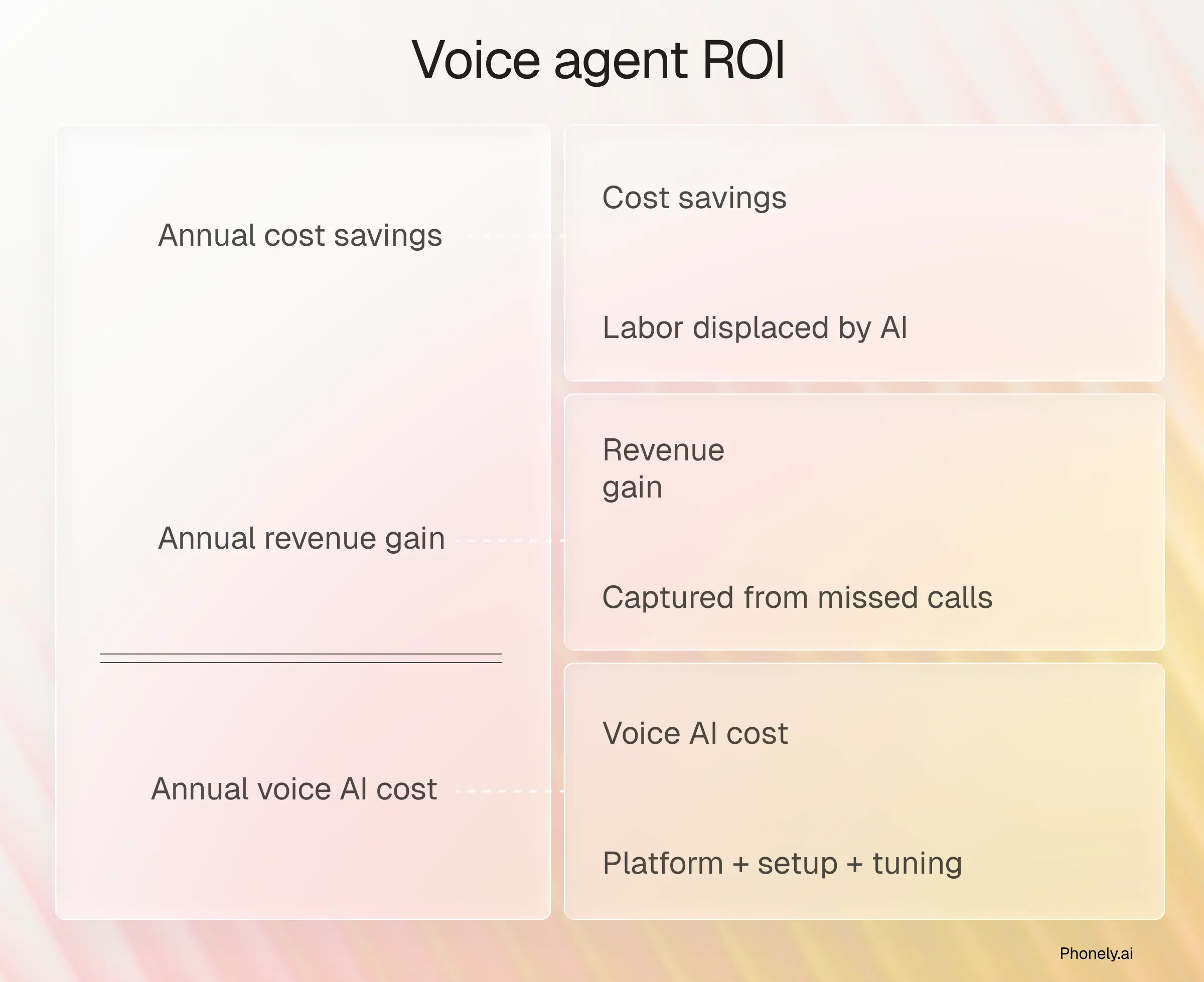
That single formula does the headline math. Two other calculations give you a more complete financial picture, and most CFOs will want both.
Payback period (months) = Total upfront implementation cost ÷ Monthly net benefit
Upfront implementation cost means the one-time setup, integration, and workflow design fees. Monthly net benefit means monthly benefits minus monthly recurring costs (subscription, oversight, and any monthly platform fees). Recurring costs belong in the denominator, not the numerator.
Annual net benefit = Annual benefits − Annual costs
Use ROI percentage to compare voice AI against other investments. Use the payback period to set expectations on time-to-value. Use net benefit to size the budget impact.
What counts as annual benefits in voice AI ROI?
This is where most ROI calculations break. Four categories matter:
- Direct labor displaced. Hours of human agent time replaced by voice AI, multiplied by your fully loaded hourly cost per agent.
- Revenue recovered. Inbound calls that would otherwise have been missed (after-hours, peak-hour overflow, holidays) and the typical conversion or retention value of those calls.
- Cost avoidance from FCR lift. When voice agents resolve calls on the first try, you save on the cost of repeat calls. With the average inbound call at $7.20, a 1% first-call-resolution improvement on 100,000 annual calls is worth about $7,200 a year.
- Outbound automation. Voice AI handles proactive outbound calls (delivery coordination, appointment reminders, payment follow-ups, feedback collection) without agent time. Most ROI models miss this because they only count inbound deflection, but outbound is a separate cost center that voice agents can address.
What costs go into voice agent ROI?
Voice AI cost breaks down into four categories: platform, setup, design, and oversight.
- Platform subscription. The recurring license fee.
- Setup and integration. Connecting your voice AI to your CRM, scheduling tools, and payment systems. Phonely's prebuilt integrations reduce this category meaningfully.
- Workflow design. Conversation flows, prompts, escalation rules, and ongoing tuning.
- Human oversight. QA reviews, supervisor escalation handling, and improvement cycles.
How long should you measure voice agent ROI over?
A 12-month ROI calculation will look different from a 36-month one, and both can be defensible. A 24-month horizon often makes sense because it captures the scaling curve from pilot to full deployment.
BCG's Widening AI Value Gap 2025 report, based on a global survey of 1,250 senior executives and AI decision makers, found that AI leaders (the 5% of companies BCG calls "future-built") expect 40% greater cost reductions and double the revenue increase of laggards in the areas where they apply AI. That gap is widening, which means longer measurement windows reveal the full ROI picture more clearly than 90-day snapshots.
Key takeaway: Voice agent ROI has three formula variants worth tracking. ROI percentage compares the investment against alternatives. Payback period sets time-to-value expectations. Net benefit shows the absolute dollar impact.
A full worked example, using a 5,000-call-per-month operation with realistic numbers in every category, comes later in this article. The next section covers the metrics you need to track to feed each input in this formula correctly.
Which metrics should you track to measure voice agent ROI?
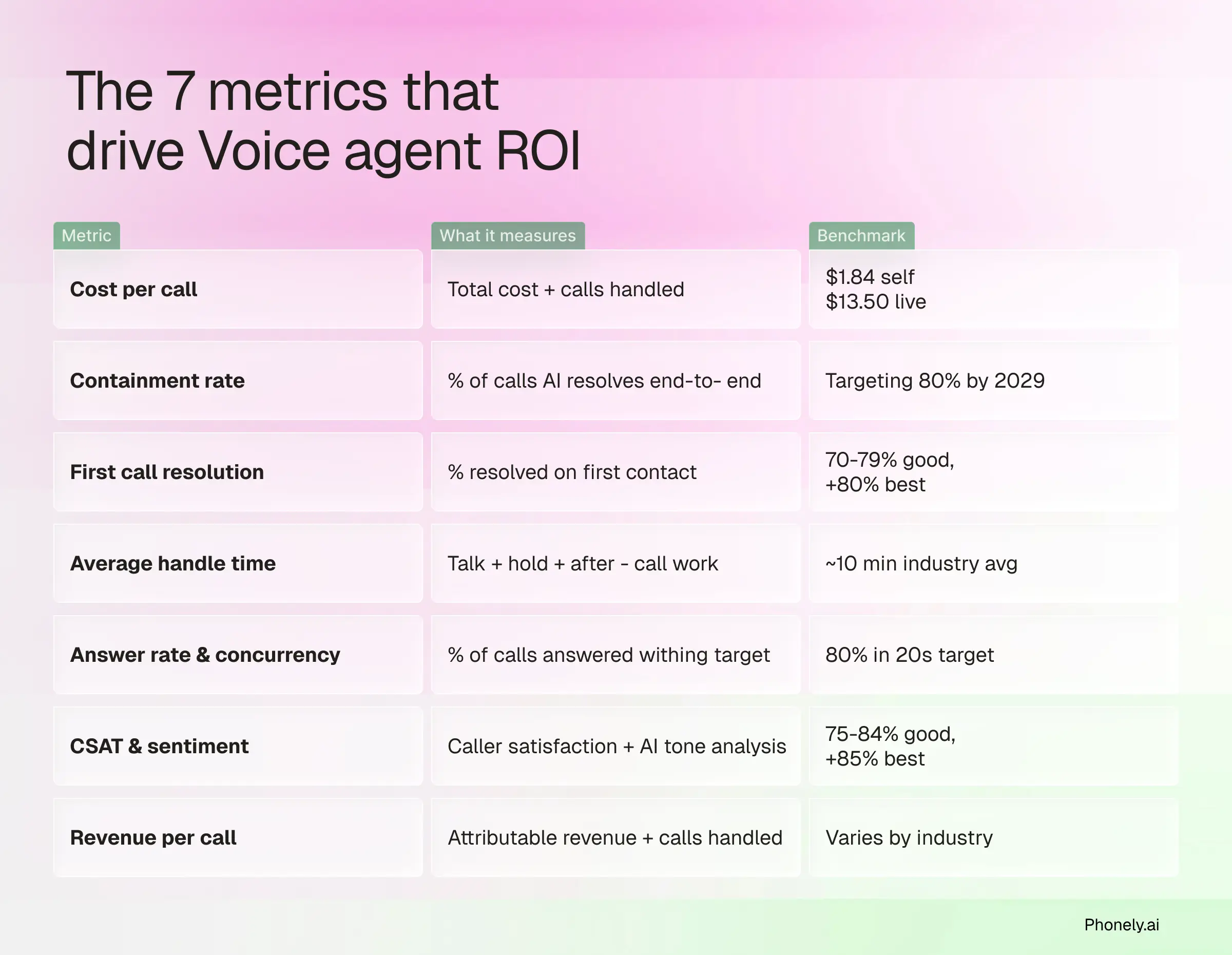
Each metric here feeds into one or more inputs in the formula above. Track them together, not in isolation. A great containment rate with falling CSAT means you're cutting costs at the expense of experience, which doesn't actually deliver ROI.
- Cost per call
Simply put, this is what it costs your business to handle one inbound call, including labor, technology, and overhead.
Cost per call = Total contact center operating costs ÷ Total calls handled
Gartner benchmarks the median cost per contact at $1.84 for self-service and $13.50 for assisted channels like phone, chat, and email. Voice AI sits closer to the self-service end of that range, which is where most of the labor-displaced ROI in the formula comes from.
What good looks like: voice AI cost per call coming in well under your live-agent baseline, with no drop in resolution quality.
- Containment rate
The share of calls a voice agent fully handles end-to-end without escalating to a human.
Containment rate = Calls fully resolved by AI ÷ Total calls handled by AI × 100
Gartner projects that by 2029, agentic AI will autonomously resolve 80% of common customer service issues, cutting operational costs by 30%. Today's voice AI deployments are still ramping toward that ceiling, with results varying heavily by call type and configuration. Chasing a high containment number alone can backfire: customers who abandon the conversation, get stuck in misunderstood loops, or call back to a human anyway all inflate containment without improving the experience.
What good looks like: rising containment over the first 90 days as conversation flows tune, with no drop in CSAT.
- First call resolution (FCR)
The percentage of calls fully resolved on the first interaction, with no callback or transfer needed.
FCR = Calls resolved on first contact ÷ Total calls × 100
SQM Group benchmarks put a "good" FCR at 70% to 79%, world-class at 80% or higher, and find that only 5% of call centers reach the world-class mark. SQM also estimates that every 1% improvement in FCR is worth roughly $286,000 a year for a midsize call center. That's the FCR-to-ROI bridge.
What good looks like: FCR climbing alongside containment, not at the expense of it.
- Average handle time (AHT)
The average duration of one call, including talk time, hold time, and after-call work.
AHT = (Total talk time + Hold time + After-call work) ÷ Total calls
SQM Group benchmarks the industry-standard AHT at approximately 10 minutes for customer service call centers, with some companies reporting closer to 7 minutes. AHT varies dramatically by call type, line of business, and industry. Voice AI typically runs shorter than human AHT for routine calls and longer for calls that escalate, because the AI tries first and then hands off with full context.
What good looks like: shorter AHT on contained calls, full-context handoffs on escalated calls, no overall drop in CSAT.
- Answer rate and call concurrency
Answer rate is the share of inbound calls answered within an acceptable time. Call concurrency is the number of calls a system can handle at the same time.
Answer rate = Calls answered ÷ Total calls offered × 100
ContactBabel puts the 2026 US average speed-to-answer at about 74 seconds, well above the industry service-level target of 80% of calls answered within 20 seconds. Voice AI changes the equation entirely. Concurrency is effectively unlimited, so every call is answered on the first ring regardless of volume.
What good looks like: 100% answer rate, zero queue, no missed calls.
- CSAT and sentiment score
CSAT is a post-call survey rating of the caller's satisfaction. Sentiment score is an AI-derived rating of the emotional tone of the call.
CSAT = (Satisfied responses ÷ Total responses) × 100
SQM Group puts a "good" contact-center CSAT in the 75% to 84% range, with 85% or higher considered world-class. Sentiment scores vary by tool, but a pattern of negative-sentiment calls catches problems CSAT misses, like frustrated callers who hung up before the survey. With Phonely, every call carries an automatic sentiment read, so these patterns surface without manual review.
What good looks like: CSAT holding steady or rising as containment grows, with sentiment scores flagging individual call issues for review.
- Revenue per call
The average revenue generated per call, calculated across both inbound (recovered or converted) and outbound (booked or sold) calls.
Revenue per call = Total attributable revenue ÷ Total calls handled
There's no universal benchmark for this metric because it varies enormously by industry. A B2B SaaS demo call may be worth $200 in expected revenue. A home service booking may be worth $400. A scheduled medical appointment may be worth $150 in retained revenue.
What good looks like: a clear, defensible number for your business that lets you compute the revenue-recovered input for the formula.
Tracked together, these seven metrics tell you whether voice AI is paying off and where. The next step is running the actual calculation: pulling current numbers from your contact center, projecting the AI investment, and producing a defensible ROI figure that your finance team will accept.
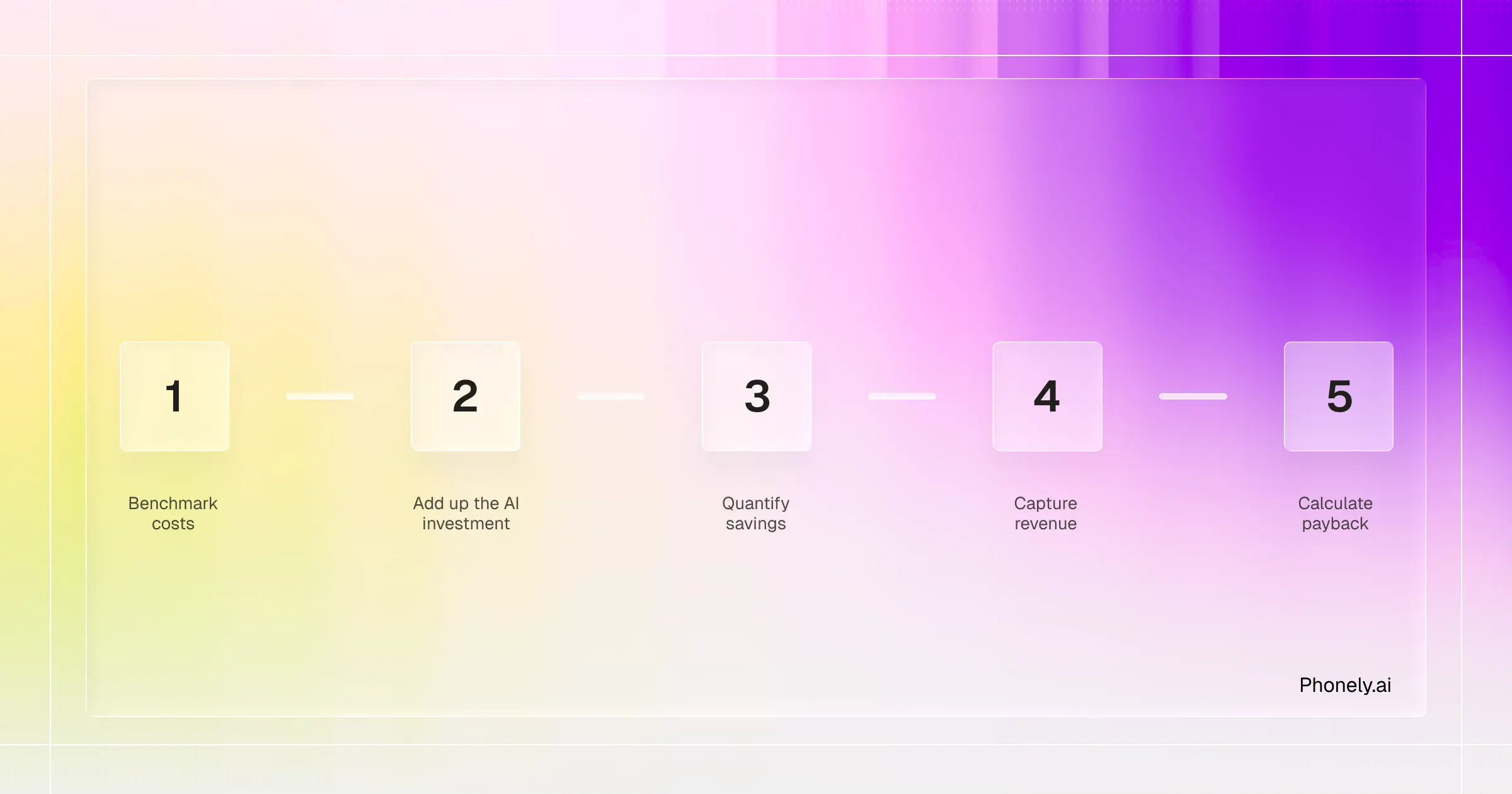
How to measure ROI from voice agents in 5 steps
The biggest cost lever in voice AI ROI is labor. The Bureau of Labor Statistics reports that US private-industry compensation averaged $46.15 per hour worked in December 2025, with benefits making up nearly 30% of that total. At meaningful call volume, automating routine inbound calls compounds into measurable savings quickly.
But cost displacement is only half the picture. For businesses with high-intent inbound calls (sales lines, booking flows, qualified leads), the larger half of ROI is often revenue captured from calls that would otherwise have been missed. The methodology below covers both sides.
You'll get the cleanest numbers with at least 90 days of baseline call data. Without it, run the steps as projections first.
Step 1: Benchmark your current call center costs
Establish the "before" number that voice AI gets measured against.
Current cost per call = Total contact center operating spend ÷ Total calls handled
Total operating spend includes loaded labor, technology, facilities, and overhead. Use fully-loaded compensation, not just base wages. Most cost-per-call calculations come in too low because they apply base wage instead of fully-loaded compensation.
Step 2: Add up your voice AI investment
Catalog every cost of running the AI, not just the subscription line.
Annual voice AI cost = Platform fee + (Setup ÷ amortization period) + (Monthly internal hours × loaded rate × 12)
Inputs include platform subscription, one-time setup, internal hours on prompt design and CRM integration, ongoing optimization, and any continued human oversight.
Step 3: Quantify direct cost savings
Calculate how much human-agent labor the voice AI displaces, plus FCR-driven cost avoidance.
Annual cost savings = (Call volume × Containment rate × Current cost per call) + (FCR uplift × Cost per repeat call avoided)
Containment rate is the leverage point. The rest of the calls still route to humans, who handle them with full context from the AI handoff.
Step 4: Capture revenue gains and soft ROI
Add the revenue side of the formula. For most high-intent inbound businesses, this is the larger half.
Annual revenue gain = (Recovered calls × Revenue per call) + Retention value
The recovered call number is usually the biggest single line. Voice AI's unlimited concurrency captures after-hours calls, abandoned holds, and missed callbacks that would otherwise have been lost.
Step 5: Calculate payback period and annual ROI
Produce the two final numbers:
ROI multiple = (Annual cost savings + Annual revenue gain) ÷ Annual voice AI cost
Payback period (months) = Setup cost ÷ ((Annual savings + Annual revenue − Annual voice AI cost) ÷ 12)
ROI multiples typically read more cleanly than percentage ROI for executive reporting. A 4x return lands fast; a 300% ROI requires translation.
What are the most common voice agent ROI mistakes?
- Using base wage instead of fully-loaded compensation. BLS puts benefits at nearly 30% of total compensation.
- Forgetting setup costs. Amortize one-time spend over 2-3 years.
- Counting transferred calls as fully contained. Only end-to-end resolutions count.
- Double-counting the same call as both an answer-rate win and a revenue-recovery win.
- Comparing year-1 ROI (which includes setup) to multi-year run-rate ROI. Be explicit about the period.
Voice agent ROI in action: a 5,000-call-per-month scenario
Same baseline (60,000 calls/year, $7.20 current cost per call per ContactBabel's 2026 US Decision-Makers' Guide, plus an illustrative $60K annual voice AI platform cost). Containment rate varies.
Most well-tuned deployments target 60-70% containment in the first 6 months. Pushing for 80%+ in early deployment typically produces poor escalation handling that costs more in CSAT than it saves in labor.
Cost displacement only. Adding the revenue captured from previously-missed calls (Step 4) can double or triple the ROI multiple for high-revenue-per-call businesses.
Phonely brings these inputs together automatically. Per-call summaries, sentiment, and CRM updates sit in one place rather than spread across separate systems.
How Phonely makes voice agent ROI easy to measure
Voice AI ROI depends on the data behind it: which calls escalated, why they escalated, and what callers actually felt. Phonely produces that data on every call.
- AI call summaries and sentiment after every call
Phonely generates an AI summary and sentiment analysis for every call. The summaries capture what happened during the call. Sentiment analysis flags how callers actually felt, including calls where tone deteriorated before transfer.
- Custom reports built inside the platform
Phonely's custom reports live inside the platform. Build the dashboards your ROI calculation needs (cost per call, containment rate, FCR, revenue per call) without exporting raw data to another system. The reporting layer runs on Phonely's own call data.
- Pipe insights into your existing monitoring stack
Phonely also pushes data out.
- CRM updates fire in real time during the call, so opportunities and contact records reflect what just happened.
- Reports pipe into your monitoring tool of choice.
- The custom integration layer connects to any software, including tools without an API.
Real voice agent ROI from Phonely customers
Phonely's customers span call center outsourcing, healthcare, SMB partnerships, and insurance contact centers. The numbers below come directly from those deployments:
Ready to run these numbers on your own calls?
Your first 100 minutes with Phonely are completely free.