Key takeaways
- Your phone's built-in auto-answer setting is enough if you just need your own handset to pick up hands-free, but a business that wants calls actually needs an AI voice agent.
- The phone setting is fine for hands-free personal use, but it falls short for business. It picks up spam and customers alike, works on a single device, and leaves no record of who called or why.
- An AI voice agent does the full job inside one call: it books appointments into your calendar, texts confirmations, answers common questions, qualifies leads, and transfers to a person with context when a call needs one.
- Phonely brings the number, voice, booking, texting, and routing onto one platform instead of a five-tool do-it-yourself stack, so most businesses are answering calls within five minutes and without writing any code.
- The payoff is proven across sizes, from small businesses capturing every lead to large operations cutting costs up to 80%, and several enterprise customers thought enough of the results to invest in Phonely directly.
The short answer
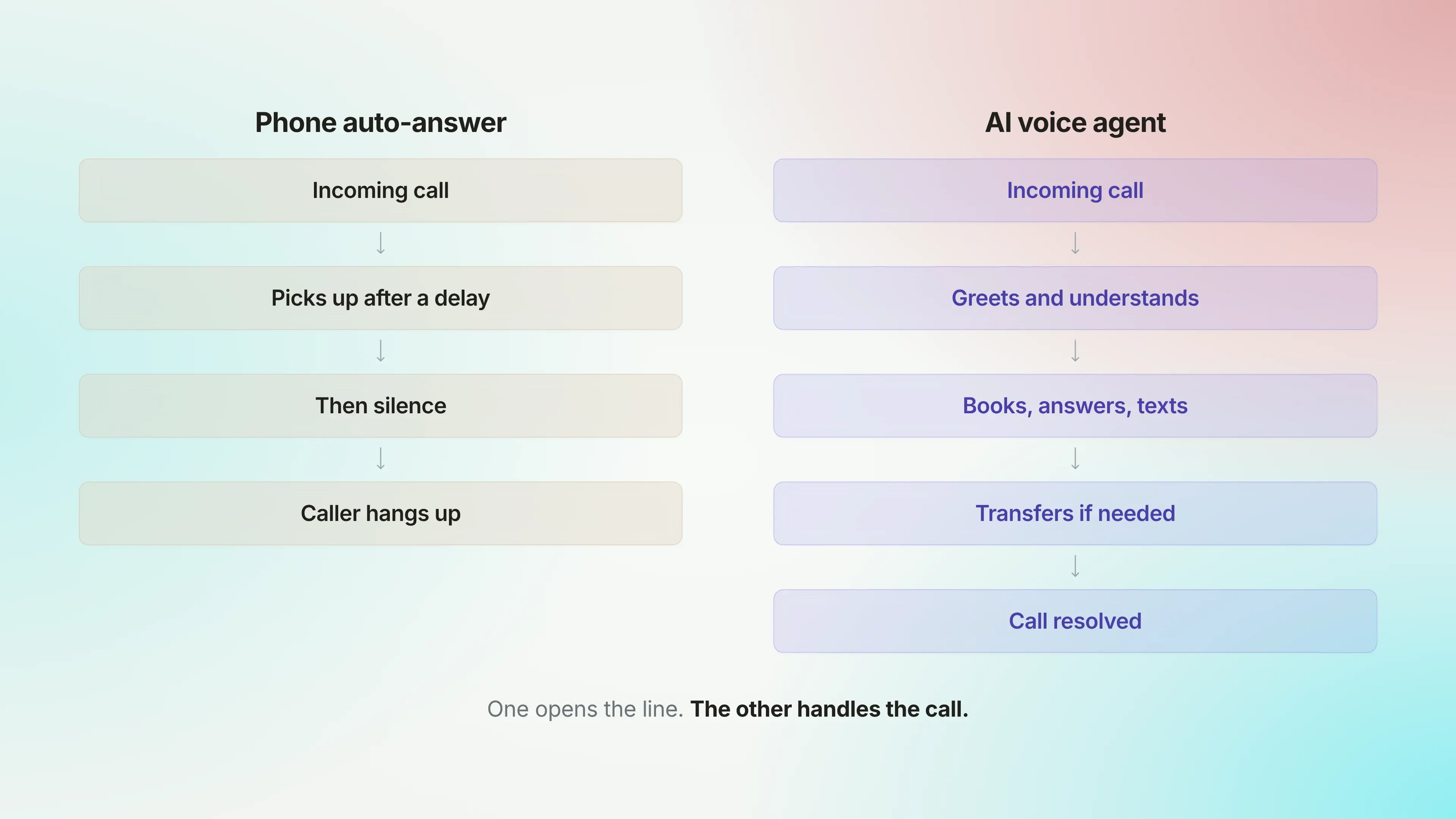
Yes. There are two ways to automatically answer a phone call: turn on the auto-answer setting on your iOS or Android, or use an AI voice agent. Auto-answer only picks up the line and then waits in silence. An AI voice agent answers, understands what the caller wants, holds a real conversation, books appointments, and routes the call to a person when it needs to, at any hour.
Which version you need comes down to why you are asking.
If you just want your own handset to stop demanding a tap every time it rings, say, while you are driving or working with your hands, that is a quick settings change. You'll find where it lives on iOS and Android a little further down this page.
If you are asking because calls keep slipping past your business, a settings toggle will not fix it. A phone that answers itself and then says nothing still loses the booking, the unanswered question, and the patience of whoever is on the other end. Closing that gap is the reason Phonely exists. Its AI voice agents treat every ring as a conversation to be handled rather than a notification to be silenced, which is how the 10,000+ businesses on the platform answer calls they would otherwise lose.
How to auto-answer calls on iOS and Android (and where it stops)
Both iOS and Android can pick up calls on their own. The feature is real, it costs nothing, and switching it on takes less than a minute. On iOS, it lives in the accessibility settings. Meanwhile, on Android, it sits under your calling or accessibility settings, though the wording moves around depending on whether you carry a Samsung, a Pixel, or something else. Set it, choose a delay, and the handset starts accepting calls without a tap.
For most people who came here about their own phone, that is the whole answer, and it does the job they wanted. The complications start the moment a business tries to lean on it.
Three limits make the built-in setting the wrong fit for a company that runs on its phone.
It cannot tell a customer from a robocall. The setting answers indiscriminately, so the same delay that connects a paying customer also connects every spam dialer and misdial, which is not what you want greeting the people who call your business.
It is tied to one device, often one with a headset attached. A line that rings five times at once on a busy morning gets no help from a feature built for a single handset in one person's pocket. The second, third, and fourth caller are on their own.
It leaves nothing useful behind. No transcript, nothing on your calendar, and no one prompted to follow up. The opportunity passes straight through the phone and is gone.
So the built-in setting solves a small problem, the tap on the screen, and leaves the one that matters wide open: who actually talks to the caller once the line is live. An AI voice agent is the answer to that question, and it is what the rest of this guide is about.
What an AI phone agent does the moment it picks up
What follows all happens inside one phone call, in real time, and in a natural speaking voice rather than the robotic menu people brace themselves for. A single Phonely agent covers ground that used to take a receptionist, a scheduler, and a first-line support rep between them.
Here is what it does, roughly in the order that tends to matter most:
- Books appointments and updates your CRM
Booking is the real test of a phone agent. A caller asks for a time that's already taken, and a script with no live calendar behind it has nothing to offer.
A Phonely agent handles that moment the way a good receptionist would. It works from your real availability and the booking rules you set, confirms the time the caller chooses, and writes it straight into your system.
Because it integrates with the tools businesses already run on, including Google Calendar, Outlook, Salesforce, HubSpot, and Pipedrive, the appointment, the contact details, and the notes from the call all land where your team will see them. Lifelike Health, a Phonely customer, has booked more than 250,000 appointments.
- Texts confirmations and follow-ups automatically
Texting is usually a consolation prize. A call gets missed, a "sorry we missed you" message goes out, and everyone hopes the lead circles back.
A Phonely agent works the other way round, because the call was already answered. It can send a booking confirmation while the caller is still on the line, share a link they asked for, or follow up by text once the call wraps, all through built-in outbound SMS.
The caller hangs up with the details already on their phone instead of a vague promise that someone will be in touch.
- Answers FAQs and qualifies leads
A large share of any business's calls are the same handful of questions. Your opening hours, whether you cover a particular area, what something costs, and how to reset a login.
A Phonely agent answers them from your knowledge base, worded the way you would word it, without a colleague breaking off what they are doing. In the same conversation, you can ask the questions that tell you whether a caller is worth your team's time, so a sales lead arrives already qualified and a support caller arrives already sorted into the right queue.
The questions, the flow, and the answers are all yours to set.
- Transfers to a human with full context
The aim is not to automate every call to the bitter end. Some calls need a person: an upset customer, a tangled account problem, a deal big enough to deserve a human voice.
A Phonely agent is set to spot those moments, whether by request, by a drop in sentiment, or by topic, and hand the call over warmly. The person who picks it up is not starting cold. They get who is calling, what the caller needs, and the context of the call, so no one has to ask the customer to begin again.
A transfer that dumps the caller back at square one is worse than no transfer at all, which is why this gets set up before any agent goes live.
- Works across phone, chat, and SMS in over 100 languages
Customers do not stay on one channel. The same Phonely agent handles phone, chat, and SMS, so you get the same quality of conversation whether someone calls, texts, or opens a chat window.
It also speaks more than 100 languages, and the switch is automatic: the moment it hears a caller change language, it carries on in theirs.
For a business serving a mixed or international customer base, that is the line between a caller feeling at home and a caller hanging up.
One platform, not five tools stitched together
Ask online how to build an AI agent that answers your phone, and you will get the same recipe every time: get a number from one provider, bolt on a voice tool, connect a scheduler, wire it all together with an automation layer, then register separately before you are allowed to text customers. Five logins, five bills, and five things that can break independently of one another.
For a developer with time, that is a weekend project. For an owner who is already answering the phone, doing the books, and running the actual business, with no technical background to fall back on, it is a non-starter.
Phonely is all of that in one place. The number, the voice, the booking, the texting, the routing, and the reporting live on a single platform, so there is nothing to integrate before you can answer your first call. You build the agent in a no-code dashboard, point your number at it, and it gets to work.
That is why setup is measured in minutes, not weeks. Phonely reports that 70% of businesses get started in under five minutes: no engineer, no integration backlog, and no waiting on a vendor to connect two systems that were never meant to talk to each other.
The real relief comes later, when something changes. Add a service, switch to a new calendar, open a second location, and you change it once, in one place, instead of chasing the same edit through five separate tools and hoping nothing breaks along the way.
Proof: What businesses get when AI answers every call
Every voice AI company will tell you it answers calls. What matters is what answering them actually changes, and that is easier to show than to claim.
Here is what it has meant for Phonely customers at both ends of the size scale, from one-person shops to enterprise contact centers.
At the small end, the win is simply never missing the call that pays the bills.
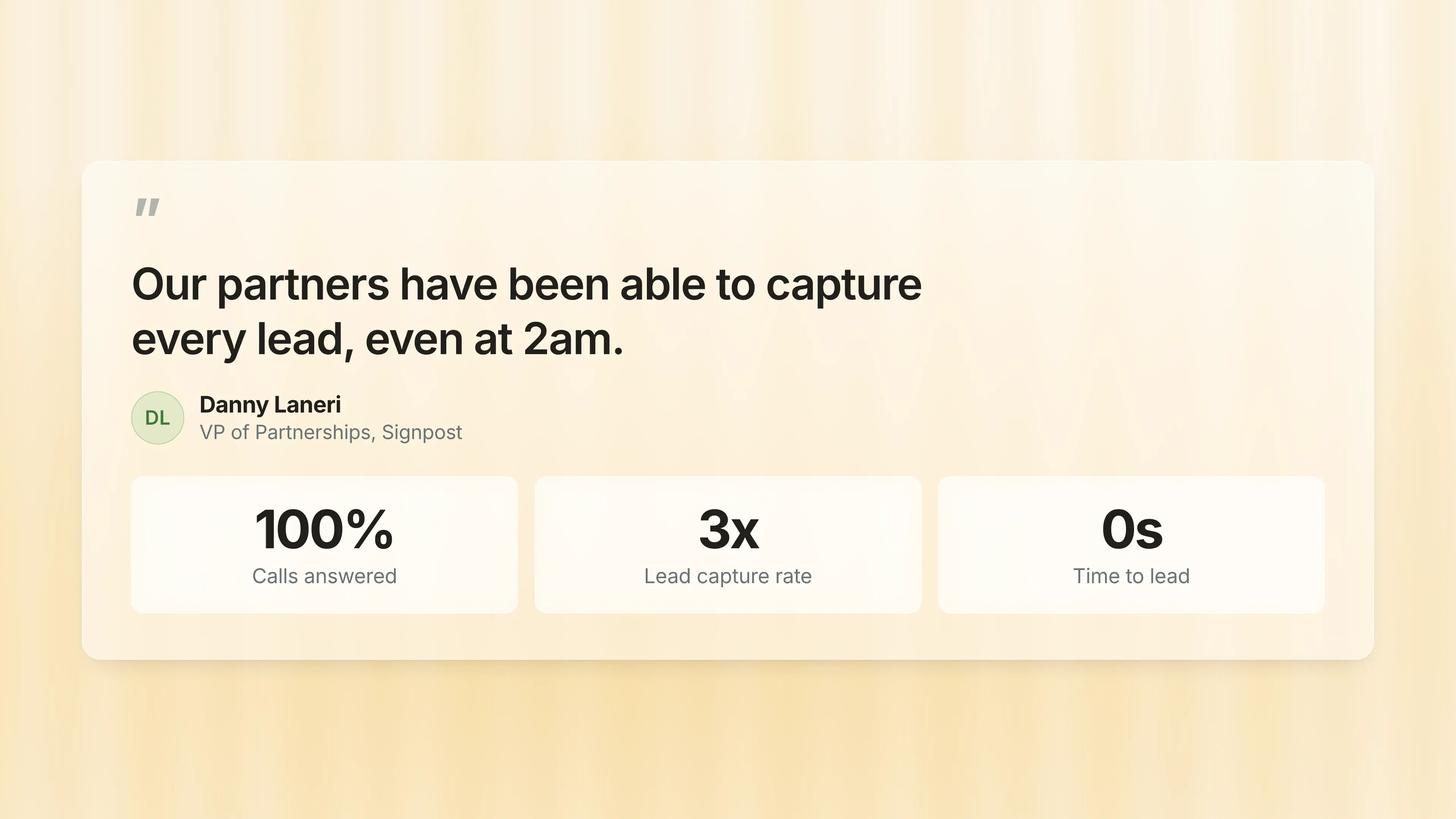
Signpost works with local businesses that cannot afford to let one ring out. With Phonely answering, its partners capture every lead, in the words of its VP of Partnerships, "even at 2 am." For a mom-and-pop shop, that is an enterprise-grade front desk on a corner-store budget, and the return showed up right away.
At the other end, the story is cost and quality at scale.
Etech Global Services chose Phonely after testing every competitor and concluding that "nobody else can do what Phonely does."
TSA Group, which employs 4,500 human agents, runs its calls through Phonely with agents, its head of AI says, "resolve calls better than our best people."
There is a harder signal than any testimonial. When Phonely raised its Series A, three of those enterprise customers, Etech, TSA, and Engage CX, did not simply renew their contracts. They invested their own money in the company.
Businesses rarely buy equity in a vendor they could just keep paying by the minute, and that is a kind of proof no feature list can manufacture.
The through-line is the range. The same platform that lets a single-location shop answer every call after midnight is the one an enterprise contact center trusts to run its floor. Few tools are asked to do both, and fewer have the numbers to show for it.
Answer every call automatically with Phonely
You came here asking whether a phone call can be answered automatically. It can, and for a business, that means an AI voice agent that takes the call from start to finish.
Phonely makes getting one live straightforward, and you can try it before you commit.
Frequently asked questions
- Can AI answer phone calls without a human?
Yes. An AI voice agent handles the call on its own, with no one else on the line. It greets the caller, figures out what they need, answers questions, books appointments, and brings in a person only when the call truly needs one. The handoff to a human is built in, so callers are not left stuck with a bot that cannot help.
- How natural does an AI phone call actually sound?
Far more natural than the automated systems people remember. Phonely's agents speak in human-sounding voices, take turns the way a person does rather than talking over the caller, and reply in under 400 milliseconds, quick enough that the awkward pause between question and answer is gone. The result feels like a conversation, not a recording.
- Is an AI phone answering service secure and compliant?
Yes, though that depends on the provider, not the idea. Phonely is SOC 2, HIPAA, and PCI compliant, with encryption and access controls around the data from every call. That is why it is trusted in regulated fields like healthcare and insurance, where a single mishandled call carries real legal and financial risk.