Key takeaways
- An AI business phone system is a cloud-based platform that holds a real conversation and completes the caller's request on its own, rather than just connecting or recording the call.
- The difference is connect versus resolve. Old systems route a call to a person or voicemail, while an AI system has the conversation and acts on it.
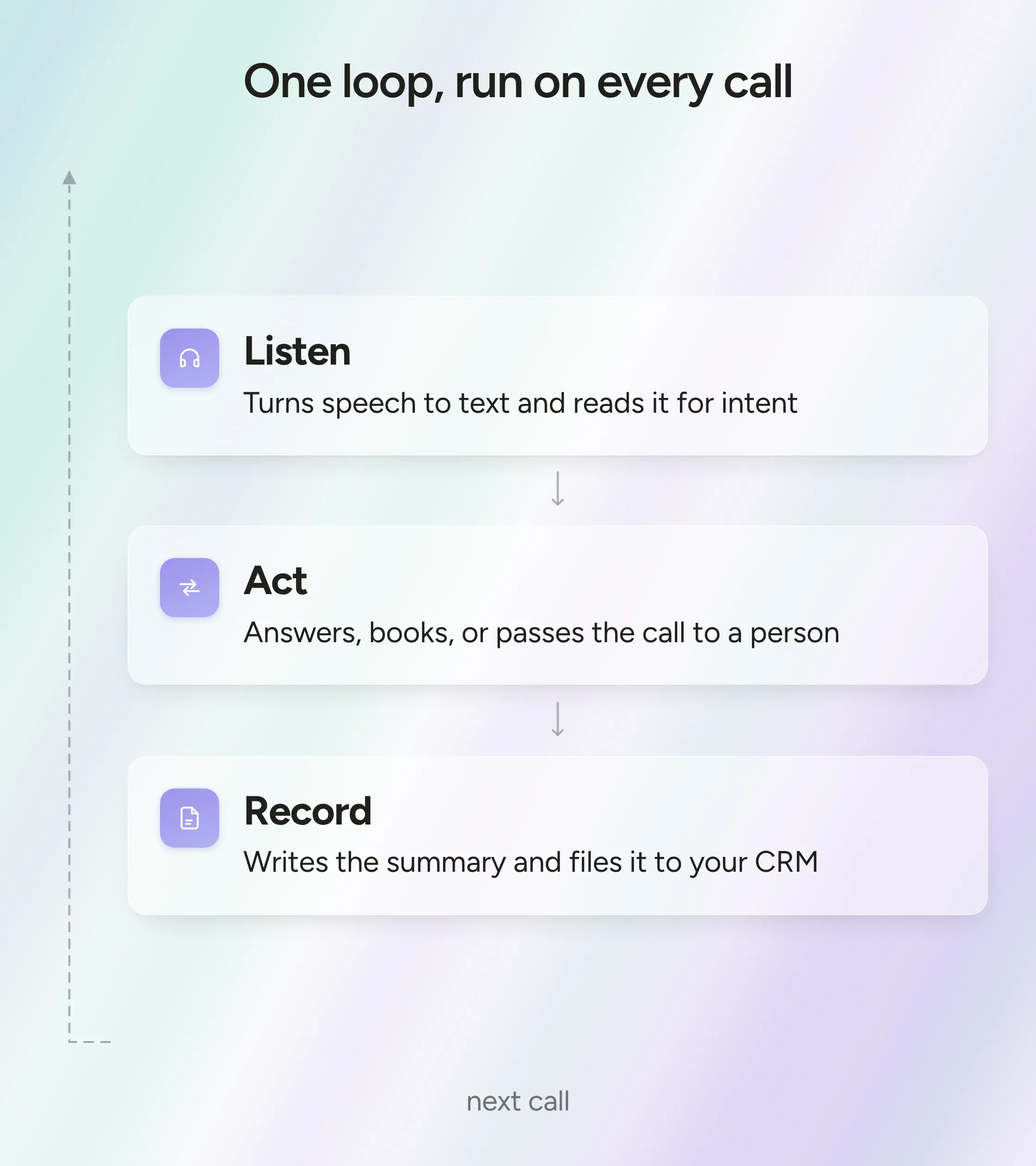
- It runs one loop on every call. Understand the caller, handle or transfer the request, then log it to your CRM.
- The features worth holding out for are a human-sounding voice, 24/7 handling, no-code setup, and provable security like HIPAA.
- The payoff is sharpest where calls come in nonstop, fewer missed calls, freed-up staff, and volume you can scale without hiring.
- Pricing is per minute, per seat, or a flat bundle, and the model matters as much as the price. Usage-based pricing fits AI best, while per-seat often means it was bolted on.
What is an AI business phone system?
An AI business phone system is a phone platform that uses artificial intelligence to answer calls, hold a real conversation, and resolve what the caller needs on its own, instead of simply routing the call or taking a message. It works out why someone is calling, handles routine requests like booking an appointment or answering a pricing question, and routes anything complex to the right person, so more calls end in a resolution rather than a voicemail.
For most growing businesses, the phone system itself was never the problem. The gap was that calls arrive while everyone is already busy, and a traditional setup can only cover that with an auto attendant or voicemail.
The phone still matters here, because it is where high-value conversations tend to begin. Nearly 80% of consumers say the phone channel is important for dealing with businesses, and they reach for it most on the calls that carry real weight, like healthcare (64%) and big purchases such as a mortgage or car (55%). Those are the moments worth being available for.
An AI phone system keeps you reachable for those calls, answering on the first ring and carrying the conversation from there. That is also what sets it apart from AI features added to ordinary call software. A summary or voicemail transcript still assumes a person was there to take the call. Here, the system takes it, then decides in the moment whether to answer the question, book the follow-up, or pass the caller to a human who can help.
That last part, deciding instead of just routing, is what makes this more than a smarter VoIP line. The difference is clearest side by side.
AI phone system vs. traditional & VoIP systems
The first upgrade most companies already made was the move from copper lines and on-site hardware to VoIP, which runs calls over the internet through software. It made calling cheaper, easier to manage, and reachable from anywhere.
What that shift did not change is the job the phone system does once a call connects. It still sends the caller to a person, or to a queue and voicemail when no one is free.
So "we have AI on our phones" can mean very different things. Add a transcription tool or an AI menu to a VoIP line, and the routing gets a little smarter, but the caller is still being routed. They still wait, still press numbers, still feel the system trying to move them somewhere rather than help them. The complaint is rarely that a machine answers. It is that the machine could not actually do anything.
An AI phone system is built on the opposite assumption. Instead of routing the conversation to a human, it has the conversation, works out what the caller wants, and acts on it.
The dividing line is simple. Traditional and VoIP systems exist to connect a call. An AI phone system exists to resolve it.
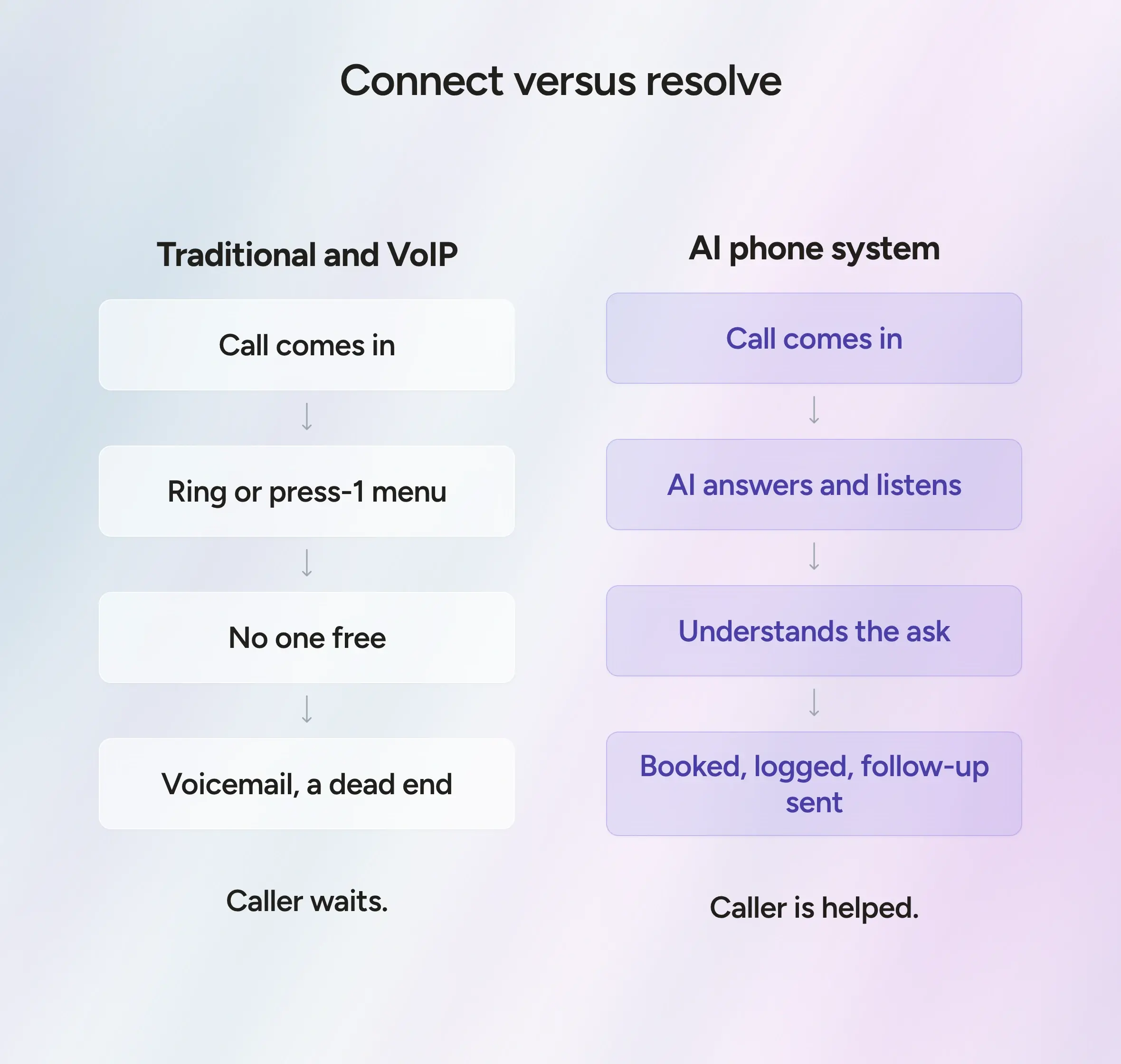
VoIP modernized how calls travel. An AI phone system changes what happens on the call. The way it does that, in real time on every call, is worth a closer look.
How does an AI business phone system work?
An AI business phone system answers the call itself, works out what the caller wants, handles it, and logs the conversation, all in real time. It runs the same basic loop a good receptionist works through, just on every call at once and without the caller noticing the machinery. It listens, figures out what they need, takes care of it, and keeps a record afterward.
- Understanding the caller
As the call comes in, the system turns what the caller says into text in real time and reads it for intent, meaning the reason behind the words rather than the words themselves. Old phone menus could never do this. They needed the caller to boil their problem down to a number to press, where an AI system just lets people explain it in their own words.
It also copes with the messy way people actually talk. A caller can change their mind partway through, give a date and then move it, or take a while to get to the point, and the system follows along instead of making them start over. If they slip into another language, it can follow that too, so a Spanish speaker is not left struggling through in English.
For the caller, it means saying what they actually need and being understood the first time.
- Acting on the call
Once it knows what the caller wants, it acts. Often, that just means answering the question then and there, the kind of routine call a business fields all day about hours, pricing, availability, or where an order is.
Other times, it carries out a task. It can book or move an appointment, take a message, send a follow-up text, or update a record, and it confirms what it did out loud before the call wraps up.
And when a call really needs a person, it passes it on, which is easy to underrate. Some calls should always reach a human, the sensitive and complicated ones especially, and the system has to know when to step aside. When it transfers, it carries the context across, so the caller does not have to tell the whole story again to whoever answers.
Done well, that handoff is what keeps callers from feeling stuck. The front desk stays covered around the clock, and the calls that genuinely need a person still get to one.
- Capturing the data
After the call, a record is written. The conversation gets transcribed and boiled down to a few lines covering what happened and what needs to happen next, then filed wherever the team already works, usually the CRM or help desk.
A busy person takes rough notes on calls that land back-to-back, or skips them entirely. The system handles every call the same way, so the next person to pick up that customer opens the record and already knows where things stand.
It also means details stop falling through the cracks. A call that once ended as a missed ring and a half-remembered name is now logged and searchable, ready for whoever needs to follow up.
Listening, acting, and keeping a record is the whole job. Doing all three well on every call is what separates a real AI phone system from a phone line with a few clever features added on. Which of those features actually matter, and which are worth holding out for, is the practical question for anyone shopping.
What are the key features of an AI phone system?
Every provider claims the same feature list, so the words stop meaning much. A few of these features decide whether a caller gets helped or hangs up annoyed, and those are the ones worth pinning down before you sign anything.
- A voice that sounds human, in any language
The voice is the first thing a caller judges, usually within a few seconds. If it sounds flat or canned, people brace for a bad experience before they have even said what they want. A strong AI voice agent sounds like a person and holds a real back-and-forth, rather than reading a script at them.
Language is the other half of it. More than 1 in 5 people in the US speak a language other than English at home, so an English-only line quietly turns away a real share of callers. The better systems cover a wide range of languages and accents and switch the moment a caller does, without making them ask.
- 24/7 inbound and outbound handling
A person answers one call at a time and goes home at five. An AI phone system does neither. It answers the moment a call rings, including the calls that land after hours, on weekends, or during a sudden rush. And it can take a hundred at once, so no one waits in a queue.
That coverage runs both directions. The same system can place calls as well as answer them, handling appointment reminders, payment follow-ups, or a quick check-in after a service, so the routine outreach that usually slips to the bottom of someone's list finally gets done.
- No-code setup and customization
Setup is where a lot of these tools lose people. If switching on an agent means a developer and a three-week project, most businesses never get there. Good platforms let you do it yourself, usually by pointing the agent at your website and existing materials so it learns your hours, services, and the questions you hear most.
That training is what keeps it from sounding like a generic bot. It should sound like your business and follow your own rules on things like booking and pricing. For anything more involved, the better providers will build and tune the agent for you instead of leaving you to work it out alone.
- Security and compliance
Phone calls carry some of the most sensitive information a business holds, like medical details, payment data, and personal records. If you work in healthcare, insurance, or finance, an AI phone system is not an option until it can prove it handles that data safely.
The questions worth asking are concrete.
- Does it meet the standards your industry requires, like HIPAA for healthcare?
- Are calls encrypted, and is your customer data ever used to train someone else's model?
A serious provider has clear answers and independent audits to back them up, rather than a vague promise that everything is secure.
Benefits and real-world use cases
An AI phone system pays off in a few clear ways, though not equally for every business. It earns the most when the phone rings all day with similar questions, and missing a call has a real cost. Where calls are rare, or each one is a delicate negotiation, the fit is looser. Where they are constant and routine, it is hard to beat.
The most immediate gain is that calls stop slipping away. The ones that used to go unanswered get picked up and acted on, so the booking gets made and the lead is captured rather than missed.
Right behind it is breathing room for your team. Once the system clears the routine questions, your people spend their time on the calls that need a person, instead of being pulled off real work to answer the same three questions all day.
The third gain is financial. Call volume can double over a busy week without a scramble to hire, because the system takes more at once instead of needing another desk and another salary.
Those gains are clearest in a handful of industries where the phone barely stops. Take healthcare, where the share of people who would rather call their provider is climbing, from 33% in 2024 to 42% in 2025.
This is already happening at scale. Phonely handles millions of calls a month across thousands of businesses. In insurance, Engage CX has driven over $10 million in policy sales through Phonely in the first four months of 2026, with its AI agents handling 15,000 calls a day. Another customer runs 60,000 calls a day, and one replaced 350 human agents in a single month.
What all of this is worth, of course, depends on what it costs to run. That is the next thing to pin down.
How much does an AI business phone system cost?
The honest answer is that it depends, and the thing it depends on most is how the system charges you in the first place.
There are three common pricing models, and the one a provider uses tells you a lot about what you are buying.
That middle row is worth a second look. Per-seat pricing was built for a world where one person handled one call, so charging by the seat made sense. An AI agent has no seat and no limit on how many calls it takes at once, which is why most AI phone systems charge by usage instead. If a quote is priced per seat, it is often a sign that the AI has been bolted onto a traditional system rather than built to run the calls itself.
Within a usage model, a few things move the bill. The biggest is the total call minutes. After that come the extras, things like outbound calling, deeper integrations, a model fine-tuned to your business, added languages, and the compliance and onboarding that larger or regulated operations need.
Phonely follows that shape. It starts free for light use, with paid plans at $50 and $150 a month that include a block of minutes, and custom enterprise pricing that drops as low as 5 cents a minute at volume. Every tier allows unlimited calls at once, so you pay for minutes used and never for seats sitting idle.
It helps to know what the alternative costs. By the time a live agent has handled a call, Gartner puts the median cost of an assisted contact at $13.50, against $1.84 when the customer self-serves. Add the median US customer service wage of $20.59 an hour before benefits, and paying by the minute starts to look like the cheaper way to cover a busy phone line.
None of this tells you which provider to pick, only what to expect on the invoice. That choice comes down to a handful of questions worth working through first.
How to choose the right AI phone system (and whether you need to replace yours)
By now, you know what a strong AI phone system can do. The harder part is matching one to your business, and the questions that matter most are not on the feature comparison page.
- Call the agent yourself before you trust the demo. A few minutes on the line, on a free tier like Phonely's, tells you more than any spec sheet. Throw it something awkward and listen for whether it keeps up or stumbles.
- Proof matters more than promises. The vendors worth trusting can name real customers in a business like yours and say what changed for them. The ones who offer only adjectives are worth skipping.
- Your own volume is the other half of it. A solo operator who keeps missing calls needs something very different from a contact center clearing thousands a day, so be honest about how many calls you get and which ones you want handled.
Then comes the question most buying guides skip. You may not need to replace your phone system at all.
This is where Phonely is built to flex. Keep your current setup and send it just a slice of your calls to start, the after-hours overflow, or the one line that never lets up, and let it handle those end-to-end while everything else stays put. Once it proves itself, you hand it more, up to the whole operation, if that is where things land.
Start with the calls that hurt most to miss, let the results make the case, and grow on your own timeline rather than betting everything on day one. The questions businesses ask most when they make that move are worth a section of their own.
Frequently asked questions
- Can callers tell they are talking to AI?
Most cannot. Phonely reports that 90% of callers cannot tell its agents are AI, because the voices are natural and the agent responds in real time to whatever each caller says. The honest exception is someone deliberately testing it, or a caller with a very unusual request, who might pick up on it. On everyday calls, about hours, bookings, or a price, there is nothing to give away.
- How quickly can an AI phone system be set up?
Faster than most people expect. Because the agent is built from your existing website and materials rather than coded from scratch, there is no developer and no multi-week rollout. Phonely says a basic agent can be ready in under five minutes, and more involved setups with custom workflows still tend to measure in days, not months. On enterprise plans, Phonely's team does the setup and optimization for you.
- Will an AI phone system work with the tools I already use?
Usually, yes. Phonely connects to common business tools through prebuilt integrations, with CRM connections available on its higher plans, so call details flow straight into your existing system. If something you rely on is not supported out of the box, it can be added through the API or built by the Phonely team on the enterprise plan. Between the prebuilt options and the API, most stacks are covered.