
.jpg)
Key takeaways
- Voice AI for call centers works by running a five-step pipeline: transcribe what the caller says, understand intent, decide a response with an LLM, speak it back in a natural voice, and trigger actions in your systems, all in under a second from when the caller finishes their sentence.
- Modern voice AI agents resolve the calls that older bots could not: FAQs, scheduling, lead qualification, payments under HIPAA and PCI, and warm escalation with full context.
- More than 90% of callers can't tell they're speaking to AI on the best platforms today.
- 88% of contact centers have adopted AI, but only 25% have operationalized it. Deployment used to take six months to a year. On Phonely, 70% of teams are live in under five minutes.
- Security is non-negotiable: SOC 2, HIPAA, GDPR, CCPA, PCI, encryption in transit and at rest, and no training on customer data.
The economics of running a contact center have shifted. Voice AI agents now answer phones, hold real conversations, and resolve calls at accuracy levels that match or beat human agents on the same workflows, at up to 80% lower operational cost.
88% of contact centers have already adopted AI in some form, but only 25% have actually operationalized it into daily workflows. Most contact center leaders know the shift is happening. Fewer have a clear picture of how voice AI actually works, what a modern agent can really do on a call, and what it takes to deploy one well.
That's what this guide covers.
What is voice AI for call centers?
Voice AI for call centers is software that uses speech recognition, large language models, and text-to-speech to hold real-time phone conversations with callers. A modern voice AI agent can understand natural speech, look up customer information in your CRM, take actions inside connected tools, and resolve calls end-to-end with no human agent required.
The shift from earlier call center automation comes down to one capability: the agent can listen, think, and act inside a single turn.
In practice, that means a voice AI agent hears "I'm calling about claim 4471, I got the adjuster's email but I need to update the loss date and confirm what documents you still need from me," pulls up the claim, updates the loss date in the system of record, lists the outstanding documents, and emails the caller a summary before the call ends.
A press-1 IVR menu cannot do any of that. It can only route the caller to someone who can. The difference shows up in the numbers. According to KPMG, voice AI now resolves 62% of calls on the first touch and has cut transfers in half.
It helps to separate three things that often get lumped together under the "voice AI" label:
This third category is where Phonely operates, currently handling millions of calls a month across healthcare, insurance, home services, financial services, and contact centers.
For a contact center, the practical difference is that a voice AI agent is no longer a deflection layer that hands off the moment a call gets non-trivial. It's a primary resolution channel.
A well-deployed agent answers the call, resolves the underlying issue, logs the interaction, and transfers to a human only when judgment or empathy is genuinely required. That matters especially when the alternative is staffing for it: contact centers face 30-45% annual agent turnover, with each replacement costing $10,000 to $20,000 before the new hire reaches full productivity.
How does voice AI work for call centers?
Voice AI for call centers runs on a five-step pipeline that turns a caller's words into real action inside your systems.
The agent transcribes what the caller says, extracts the intent behind it, generates a response with a large language model, speaks that response back in a natural voice, and triggers the right actions in your CRM, scheduler, or phone system. When the underlying stack is built for it, each response comes back in well under a second.
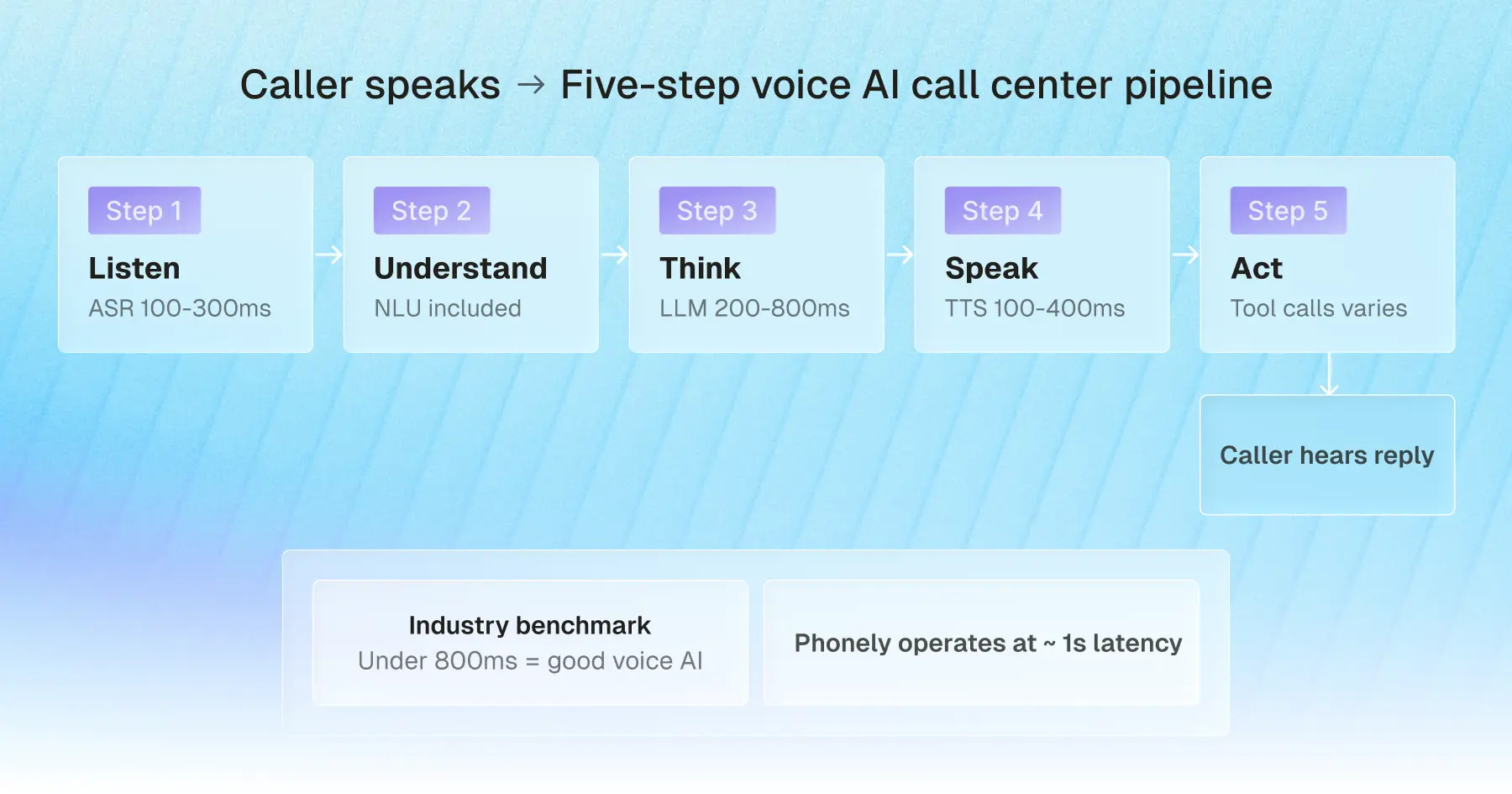
Step 1: Speech recognition captures the caller's words
Speech recognition, also called automatic speech recognition (ASR), converts the caller's audio into text in real time.
Today's best ASR models handle accents, background noise, and overlapping speech far more reliably than the engines that powered earlier voice bots, with leading systems now reaching sub-2% word error rates on clean conversational speech.
For a contact center deployment, the realistic accuracy target is below 10% word error rate, even on noisy phone-quality audio. Anything higher, and the rest of the pipeline has nothing reliable to work with. This step typically takes 100 to 300 milliseconds.
Step 2: Natural language understanding extracts intent
Once the words are transcribed, natural language understanding (NLU) figures out what the caller actually wants.
For example, "I got a letter saying my premium went up, but I never got a renewal call" is not a request for the letter. It's a billing dispute and a service complaint, surfaced in one sentence.
NLU identifies the intent, the entities (premium, renewal, missed callback), and the sentiment, then hands all of that to the next step. In modern systems, this layer is often handled by the same model that generates the response, but conceptually, it's where the agent stops hearing and starts understanding.
Step 3: An LLM decides the response
The large language model decides what happens next. It takes the caller's intent, the conversation so far, and any context pulled from your systems (account history, last interaction, open tickets) and decides what to say or do.
This is where modern voice AI separates itself from rules-based bots. The LLM can handle multi-turn conversations, reason about ambiguity, and decide when to ask a clarifying question rather than guess.
Voice AI latency at this step is the single biggest variable in the whole pipeline. A slow LLM is what makes voice AI sound robotic. Phonely runs fine-tuned models on Groq's purpose-built inference hardware, which delivers sub-400ms response times on dedicated infrastructure and is how Phonely cut overall response latency by more than 70% while lifting accuracy to over 99%, surpassing the closed-source benchmark set by GPT-4o.
According to McKinsey, contact centers using GenAI-enabled agents are already seeing a 14% increase in issue resolution per hour and a 9% reduction in handle time.
Step 4: Text-to-speech delivers a human-sounding reply
Once the LLM has decided what to say, text-to-speech (TTS) converts the response back into audio for the caller to hear.
The leap in TTS quality over the past two years is the reason modern voice AI no longer sounds like a GPS. Today's voices carry inflection, pacing, breath, and even emotion.
Phonely gives you 1,000+ voices to choose from across more than 100 languages, along with the option to clone your own brand voice. The TTS step typically generates audio in 100 to 400 milliseconds, fast enough for the caller to perceive the agent as immediately responsive.
Step 5: Integrations trigger real actions in your systems
This is the step that separates a voice AI agent from a fancier answering machine.
Through function calling, the mechanism that lets an LLM call external tools mid-conversation, the agent can pull up the caller's account in Salesforce, check open windows in Google Calendar, log a follow-up ticket in your help desk, charge a card through a PCI-compliant processor, or send a confirmation SMS.
The depth of this integration layer is what most contact-center buyers underestimate when comparing platforms, and it's where Phonely invests heavily, with prebuilt connectors to common CRMs, schedulers, payment processors, and phone systems, plus a developer API for the systems that aren't.
When these five steps run cleanly, the full loop from the caller finishing their sentence to the agent starting to reply completes in well under a second. That speed, combined with accuracy in the 99% range and natural-sounding voices, is the difference between voice AI that feels like a person and voice AI that feels like a phone tree with a friendlier voice.
Industry benchmark: under 800ms total loop time is considered good voice AI. Phonely operates at approximately 1 second end-to-end.
What can a voice AI agent do on a call?
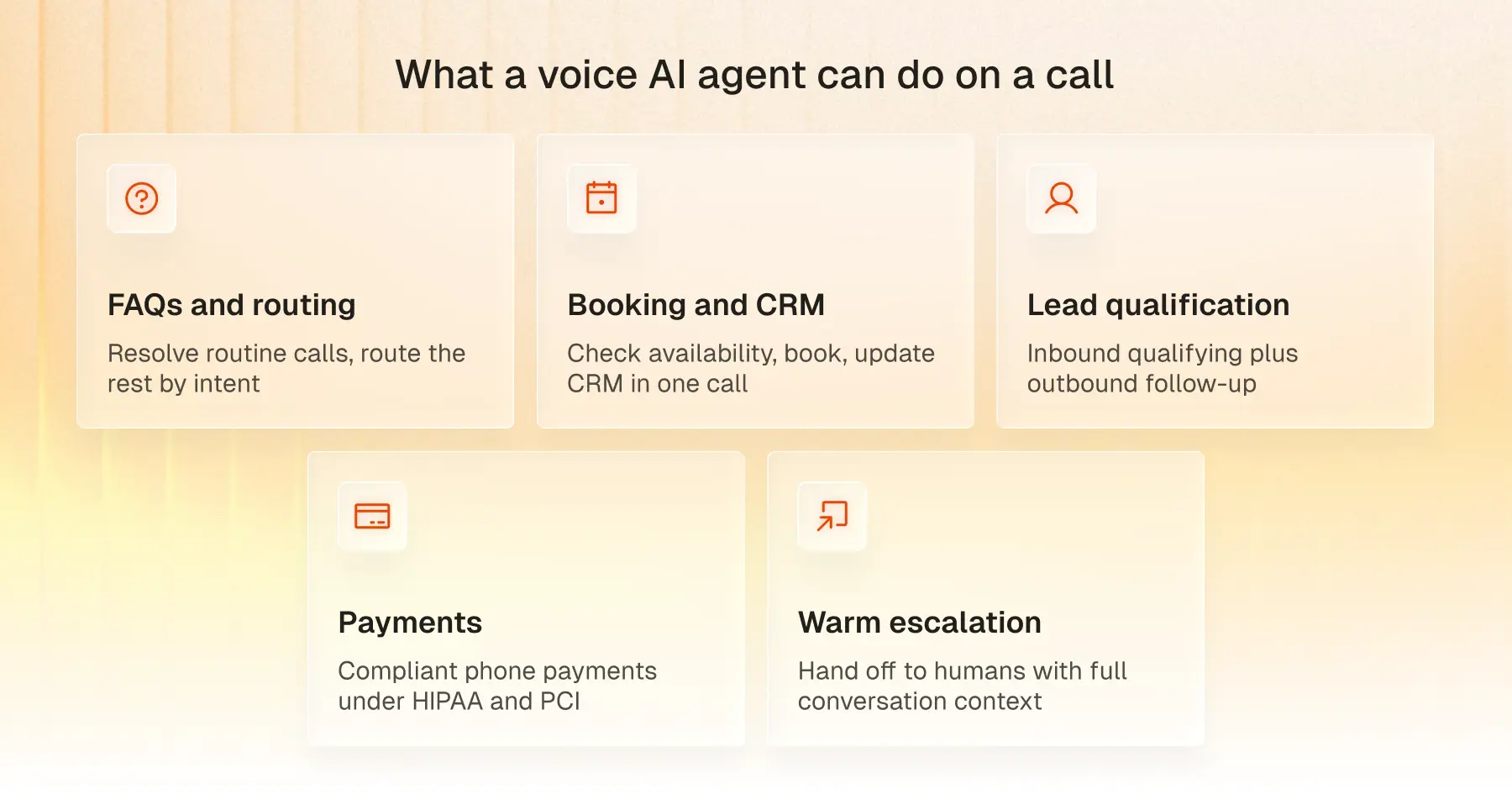
A modern voice AI agent handles five things on a call that older voice bots could not.
- Answer FAQs and route intelligently
The highest-volume thing a voice AI agent does is resolve the routine questions that don't need an expert: hours, order status, account balance, claim status, and password resets.
The agent handles these end-to-end, then routes anything it can't resolve to the right team based on intent rather than guesswork. Gartner projects that by 2026, AI will automate 70% of routine call center tasks like these, freeing human agents for the work that actually needs them.
Phonely customers like Signpost report 100% of calls answered with this pattern, even after hours.
- Book appointments and update your CRM live
Appointment scheduling is the most mature voice AI workflow today.
The agent checks calendar availability in real time, books the slot, sends a confirmation, and writes the booking back to your CRM inside a single call. Lifelike Health has booked over 250,000 appointments through Phonely with zero hold time.
- Qualify leads and run outbound follow-up
Voice AI agents handle both sides of the lead funnel.
Inbound, the agent qualifies the caller in real time and routes the lead to the right rep. Outbound, it runs proactive call-backs, web-form follow-ups, renewal reminders, and re-engagement campaigns at a volume no human team can match, at a fraction of the per-call cost.
- Take payments under HIPAA and PCI guardrails
Phone payments are one of the most mature voice AI workflows when the platform is built for it.
A PCI-compliant voice AI agent collects card details verbally, passes them to a certified processor, and never stores or transcribes the card number itself. Healthcare deployments add HIPAA on top. Phonely is HIPAA, SOC 2, and PCI-aligned, with payment workflows built into the platform.
- Escalate to live agents with full context
What happens when the AI can't handle a call is what determines whether voice AI actually works in your contact center.
A well-deployed agent recognizes the moments to hand off and transfers the call with the full conversation summary, the caller's identity, and the reason for escalation already attached. Phonely lets you define escalation paths per workflow, so the handoff matches your team's structure.
When all five of these workflows run in one platform, your contact center handles every call the same way every time, around the clock, at a fraction of the cost of staffing it.
Answer every call with Phonely
The contact centers pulling ahead right now are not the ones with the largest agent headcount. They are the ones whose voice AI actually picks up the phone, holds the conversation, takes the action, and knows when to bring in a human.
That is what Phonely does. Your first 100 minutes are free, and 70% of teams are live in under five minutes.
Start free or talk to sales if you're scaling past 1,000 calls a month.




.jpg)
.svg)